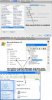
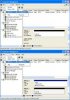
I am a certified Apple consultant, and a customer of mine has been unable to get Windows XP running in Parallels to recognize a second virtual hard drive. In My Computer, Windows sees his virtual boot volume as drive C: and the CD/DVD drive as drive D: but ignores the existence of the second hard drive even though it is activated in the Parallels Configuration screen and appears without hardware conflict messages in Windows Device Manager. I tested the procedure on my Mac and was able to replicate using Parallels Desktop 3.0 build 5582 (see file attachment).
The problem as I see it is that the newly created secondary hard disk and the CD/DVD device are competing the same drive letter (D . The computer has assigned the CD/DVD player to drive D: and has not assigned a letter to the hard disk. If I can figure out how to assign a different drive letter to the hard drive, then I believe I will have solved my customer's problem.
The number of installed and bootable devices (hard drives and CD/DVD) is less than the maximum of 4. I recognize that I'm not running the latest Parallels build (5584). I will install and test build 5584 later today.
I noticed instructions on the Parallels forum for expanding the partition drive (http://forums.parallels.com/showthread.php?t=19328&highlight=second+hard+drive).
My customer is not technically inclined, and I would prefer to help him with his requested task without having to resort to the fix mentioned in the above forum message.
The problem as I see it is that the newly created secondary hard disk and the CD/DVD device are competing the same drive letter (D
. The computer has assigned the CD/DVD player to drive D: and has not assigned a letter to the hard disk. If I can figure out how to assign a different drive letter to the hard drive, then I believe I will have solved my customer's problem.The number of installed and bootable devices (hard drives and CD/DVD) is less than the maximum of 4. I recognize that I'm not running the latest Parallels build (5584). I will install and test build 5584 later today.
I noticed instructions on the Parallels forum for expanding the partition drive (http://forums.parallels.com/showthread.php?t=19328&highlight=second+hard+drive).
My customer is not technically inclined, and I would prefer to help him with his requested task without having to resort to the fix mentioned in the above forum message.