Winx XP video display issues after sleep on Mac Book Pro

marklee

Bit poster
I am running Win XP SP2 as a non Boot Camp VM in Parallels 3.0 Build 5608. My machine is a 15" Mac Book Pro 2.4 Ghz Core 2 Duo machine. The video is NVIDIA GeForce 8600M GT with 256mg of VRAM.

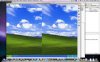
My issue is that whenever I put the machine to sleep by closing the lid while WinXP is running in a Window, upon awakening my Windows screen is "split" with half of the screen displaying. Sometimes clicking the Start Menu will fix it moemntarily, sometimes not. The only way to fix it for good is to shut down Parallels and restart it. The video problems do not affect the host OS X. (10.5.4). Attached are some screen shots. Anybody else with this issue and any ideas on a fix?
 

Attachments

  • Picture 1.jpg
    Picture 1.jpg
    23.2 KB · Views: 11
  • Picture 3.jpg
    Picture 3.jpg
    24.4 KB · Views: 12
Hi John,

Thanks for the help. As stated, I am using the latest build 5608, and I have reinstalled with the problem still surfacing. Any other suggestions? Anybody else out there running on a MacBook Pro with NVIDIA graphics chipset? There is some discussion of faults with these chips on the Apple site among others, and I am wondering if this behavior could be related.

Mark
 
NVIDIA chipset failure should reveal also in Mac OS (if it is failure),
Anyway if you have any references to Apple's site discussion please provide url

ONe more thing I would like to check if you have ever had Parallels crash (hope you haven't) it would be usefull to check logs
* Archive of /Library/Parallels/bugreports/
or ~/Library/Parallels/bugreports/

* /Library/Logs/panic.log
or ~/Library/Logs/CrashReporter/Parallels.crash.log from the Mac side;
 
Parallels 3 Build 5626 XP Video Problems Glitched Display!

Hello,

I've been running Parallels 3 for a long while now. I have never had to uninstall and have been running XP for a long while.

Recently, perhaps since the latest OS X upgrade to 10.5.6, the display will go glitchy.

All I have to do is suspend my VM. Quit Parallels completely. Start it up again. Restart the VM.

And then it seems fine.

Anybody know what's going on here? It's an annoyance that wasn't there until recently on my MBP 17".

Thanks much!
 

Attachments

  • Parallels3XPVideoGlitch.png
    Parallels3XPVideoGlitch.png
    838.4 KB · Views: 3
I'm running Mac OS 10.5.6 on a 15" MacBook Pro, running a GeForce 8600M GT chipset.

I am also getting glitchy display performance in the Windows VM after waking my Mac up. I've been running Parallels 3 since last summer and I didn't have these display errors until Parallels wanted to update itself.

I originally ran the update while Parallels and my VM were running, and I wasn't sure the update went well. I'm pretty sure after that the display glitch began after that update attempt. I re-downloaded the update, shut down the VM, quit Parallels, and ran the update from the desktop. I'm still having the display errors on waking up my MacBook. I'm running build 5626. Parallels says I'm updated.

Any guidance? Is it a conflict with the display drivers?

I also use Boot Camp and can sleep the machine and wake it without display problems when booted in Boot Camp. I'm assuming this is a Parallels issue.

Thanks for any help!
 
Fixed display error, but now can't boot into Boot Camp

I followed the steps to reinstall Parallels Desktop, which worked to clear up the graphics display error.

Now it seems I can't boot into Boot Camp directly anymore. I'm getting an error that says hal.dll is either missing or corrupt.

Any pointers?

Thanks!
 
Back
Top