Help needed to configure my network !!

masa

Junior Member
Hej ..Well I am having a problem with the new parallels 4.0. I am using internet under a network running a ISA proxy server, the requirement of the network is that my mac address is registered and I can only access the wifi from that mac address. Soo under the paralllels configuration I set up: Network adapter 1 >bridge Ethernet > Airport and under advanced i set my mac address .. The problem is that each time I open windows under parellels, then the internet works under windows but no longer under mac os.. maybe I should set it up differently but that is the only opt which allows me to access the net under windows.
In additional I did not experience any problems with the 3.0 version
My best regards masa ..
In advance thx for all help on it ..
 
Last edited:
It just seems that the Ip address on the windows is the same as on the mac os.. So when I turn windows there is a ip conflict and the internet works only on my windows.. I have no idea what to do know.. Please parallels support respond.
 
Last edited:
The recommended way to use network - is Shared Networking. It should perfectly fit in your configuration.
Please make a note here if something doesn't work in Shared Networking mode.
 
First of all thx for a reply..
I tryed it, but the net does not work under windows in that mode. When I enter the preferences under windows and lookup the ip and the rest it is completely different both the ip the default geteway.
regards masa
 
First of all thx for a reply..
I tryed it, but the net does not work under windows in that mode.
Ok. This is a problem to solve.

When I enter the preferences under windows and lookup the ip and the rest it is completely different both the ip the default geteway.
regards masa
Yes, it _should_ be so. We create "a gateway" on the MacOS X side (the prl_naptd process), so the IP and all other things on the Windows side should be like
ip address: 10.211.55.3 (may be 4 or greater)
netmask: 255.255.255.0
gateway: 10.211.55.2
and all should be obtained through DHCP.

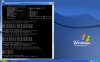
Could you please post here the output of ipconfig /all command on the Windows side while working in the Shared networking node? To do so please click Start->Run and type "cmd.exe". In the appeared command-windows please type
ipconfig /all and either post a screenshot or just copy and paste the output. I really need to see the output even if it looks like not having anything strange.

I expect that after seeing this I will be able to say what's going on. But just a few steps forward:

If parameters are correct (as like what i've typed) please type in the same Windows command line
ping 10.211.55.1
then
ping 10.211.55.2
then
ping www.google.com
 
Ip address: 10.211.55.4
Subnet_255.255.255.0
default geteway: 10.211.55.1
DHCP server :10.211.55.1
The two first request ping 10.211.55.1 and 10.211.55.2 Both Packets send 4 and 4 received
With google request timed Out .. Lost 4

regards Masa
 
Ip address: 10.211.55.4
Subnet_255.255.255.0
default geteway: 10.211.55.1
DHCP server :10.211.55.1
The two first request ping 10.211.55.1 and 10.211.55.2 Both Packets send 4 and 4 received
With google request timed Out .. Lost 4

regards Masa

Ok. This means that all networking components (drivers, host part etc) work. This also means that DNS-request succeeded (ip address of www.google.com were detected)

1. Do you have some firewall installed? If so prl_naptd process shall be configured to have all access to network.

Anyway, please try to (from terminal, Application -> Utilities -> Terminal)
/sbin/ipfw disable firewall

2. If this isn't your case, please try to remove (temporary) the Parallels Internet Security (if you have it installed) from Start->Control Panel->Add/Remove programs and try to ping www.google.com again
 
I am not using Parallels Internet Security
And I typed that command in to terminal ..
Still request timed out lost 4 _:(
 
Then a couple more things:

1) Could you please post a screenshot with output of the ipconfig /all ? I know that you have already posted the textoutput, but I need to see a screenshot

2) Please go to the Parallels Desktop(in menu)->Preferences->Networking and press the "Restore Defaults" button. Then please start the VM, send a problem report (using menu Help->Report a Problem) and post here the number of problem report
 
Can it be something that there is a mac address requirement, and i can only access the network from my specific macbook address? But under shared network i entered the mac address.
 
Can it be something that there is a mac address requirement, and i can only access the network from my specific macbook address? But under shared network i entered the mac address.

Bingo! -)

Shared networking should start work if you will regenerate the MAC address of the VM network adapter and restart the VM. Now there is a conflict between MacOS network and VM
 
Last edited:
"if you will regenerate the MAC address of the VM network adapter "
How should I do it ? in parallels ?
I am sry I am a confused but I entered the macaddress under parallels and restarted it...
 
Last edited:
"if you will regenerate the MAC address of the VM network adapter "
How should I do it ? in parallels ?

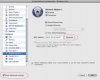
I mean VM configuration -> Network Adapter -> Generate

Screenshot is attached
 

Attachments

  • gen_mac_address.jpg
    gen_mac_address.jpg
    12.1 KB · Views: 6
Back
Top