Are you kidding me! Just forget it Parallels!

Maven

Junior Member
Originally, I had the unable to connect to drive error. I just installed the fantastic new update, and now when loading I get the BSOD. Come on, VMware is wiping the floor with you guys!

I am throwing in the towel.. lack of support and answers is annoying. I suggest you set up a FREE live support line for future issues. This way, your clients are not sitting steaming mad.
 
Maven, if you use Boot Camp, please do the following to solve the issue:
1. Load the Boot Camp partition.


2. From the Windows Start menu, choose Run and type regedit. Click OK.

The Registery Editor appears.

3. In the Registery Editor, go to HKEY_LOCAL_MACHINE\SOFTWARE\ and delete the Parallels folder. Close the editor.

4. Load Mac OS.

5. Open the VM that uses the Boot Camp partition with Parallels Desktop.
 
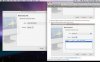
Also, the example of on your website differs from what I am seeing when I select the boot camp partition. There is no secondary box when I get to this screen.
 

Attachments

  • Picture 1.jpg
    Picture 1.jpg
    16.3 KB · Views: 5
Still the same :(

IS Windows in a pure Boot camp running fine?

1. If so login to Boot Camp, go to Run -> appwiz.cpl , remove Parallels Tools
2. Boot into Mac OS, Create New VM based on existing boot camp partition
File -> new virtual mahcine -> custom -> go through several steps ... -> Use boot camp
 
That is the same as I have been doing. Control Panel, removing Parallels tools, regedit, removing reg entries.. ect. Also, making a new VM machine....
 
Last edited:
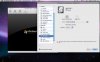
There is no option to change it from ide to scsi. That option is only available for the CD/DVD rom drive. In fact, I get an error from parallels when booting because there is no CD/DVD rom on my system and says its going to disable it. (Macbook Air)
 

Attachments

  • Picture 2.jpg
    Picture 2.jpg
    15.2 KB · Views: 9
Back
Top