The USB device cannot be connected (Blackberry 8830)

hulya eraslan

Bit poster
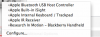
When I try to connect my Blackberry by clicking on the
Devices->USB-> "Research in Motion - Blackberry Handheld"

I get

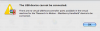
"The USB device cannot be connected.

There are no virtual USB host controller ports available in the virtual machine for the `Research in Motion - Blackberry Handheld' devide to be connected."

I have tried all the possible choices under Preferences->USB to fix this. I have also searched for the forums. I only found one other person who had the same problem. S/he solved it by removing other USB connections. I don't have any other.

How can I fix this problem?

Thanks.
 

Attachments

  • Picture 3.png
    Picture 3.png
    42 KB · Views: 3
  • Picture 4.png
    Picture 4.png
    27.8 KB · Views: 2
I had this same problem...so I am trying to remember what I did...

First, disconnect the BB. Then go to virtual machine>reset and reset the vm.

Restart windows. Connect BB (and click on usb>RIM). You should get the notices a new device has been added. Start BB DeskTop Manager....and you should be good to go. The problem I found was related to suspending the vm....do NOT do this...always shut down the vm (windows requires this to maintain settings).
 
I had this same problem...so I am trying to remember what I did...

First, disconnect the BB. Then go to virtual machine>reset and reset the vm.

Restart windows. Connect BB (and click on usb>RIM). You should get the notices a new device has been added. Start BB DeskTop Manager....and you should be good to go. The problem I found was related to suspending the vm....do NOT do this...always shut down the vm (windows requires this to maintain settings).

Thank you for the response. I have tried this. Unfortunately nothing happens when I do it. In particular, after connecting BB, I do not get notice that a new device has been added.
 
I had this same problem...so I am trying to remember what I did...

First, disconnect the BB. Then go to virtual machine>reset and reset the vm.

Restart windows. Connect BB (and click on usb>RIM). You should get the notices a new device has been added. Start BB DeskTop Manager....and you should be good to go. The problem I found was related to suspending the vm....do NOT do this...always shut down the vm (windows requires this to maintain settings).

My first reply did not appear yet, but I would like to add two more observations. Previously, I used to get
"There are no virtual USB host controller ports available in the virtual machine for the `Research in Motion - Blackberry Handheld' devide to be connected." as soon as I tried to connect BB (even though no other device was connected).

Now, after the reset, nothing happens when no other USB device is connected. But if I connect, say Apple IR Receiver, from the list of USB devices (which connects successfully) first, and then try to connect, I get the above error message again.
 
I had this same problem...so I am trying to remember what I did...

First, disconnect the BB. Then go to virtual machine>reset and reset the vm.

Restart windows. Connect BB (and click on usb>RIM). You should get the notices a new device has been added. Start BB DeskTop Manager....and you should be good to go. The problem I found was related to suspending the vm....do NOT do this...always shut down the vm (windows requires this to maintain settings).

Yet another change. I disconnected and connected back the BB again (with no reset). I know get the
"There are no virtual USB host controller ports available in the virtual machine for the `Research in Motion - Blackberry Handheld' devide to be connected." error message immediately when I click on usb->RIM.
 
hulya...I know this is frustrating. It was so bad for me that I actually purchased another internal drive to load bootcamp on. What BB software version are you running? What DM version are you running?

I would do the following:

1. remove all RIM software from your computer (this includes the DM)
2. Reset the virtual machine again
3. restart windows
4. Download and re-install the RIM software
5. restart windows, go to devices>usb...there should be no RIM showing yet
6. connect BB, be patient....your computer should recognize a new device...and eventually tell you it is now available
7. go to devices>usb>RIM

I'll cross my fingers for you. Remember to not use suspend and always use stop or shutdown windows.
 
Back
Top