Gwen Nadin
Member
Hello again
I am still having problems printing when I have Parallels running with my mac. I can print from the mac side no problem when Parallels is not running. But when I run my VM and try to print from both systems it will only let me print from Parallels. I have tried
Devices | Printer | disconnect to release the printer from Parallels but I still get the 'off line' symbol when I try to print from the mac side.
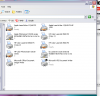
I have so many printers installed within windows xp | printers and faxes window now I am totally confused, after trying recommended fixes for this problem. I realise I am meant to use Apple Laserjet 12/640 PS as the one for my Laser and for my Photosmart Color printer I need to use HP Color laserjet 8500 PS settings. I set this up when I initially had parallels 3 and have not changed anything since I upgraded to Parallels 7. I have tried what the Parallels chap suggested but am still having the same issue I wrote about previously and being offline. I believe both my printers are set up as USB. I had so much difficulty in the 1st instance when setting up my printers on VM 3 I am wondering where to go from here. It should surely be simplier now with VM 7.
Thanks for any help with this.
Regards
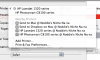
I have attached 2 screen dumps of my printers installed within win xp and also the one I get when I go to my mac side under the print window and options I am given. Don't remember seeing this window before.
Gwen
I am still having problems printing when I have Parallels running with my mac. I can print from the mac side no problem when Parallels is not running. But when I run my VM and try to print from both systems it will only let me print from Parallels. I have tried
Devices | Printer | disconnect to release the printer from Parallels but I still get the 'off line' symbol when I try to print from the mac side.
I have so many printers installed within windows xp | printers and faxes window now I am totally confused, after trying recommended fixes for this problem. I realise I am meant to use Apple Laserjet 12/640 PS as the one for my Laser and for my Photosmart Color printer I need to use HP Color laserjet 8500 PS settings. I set this up when I initially had parallels 3 and have not changed anything since I upgraded to Parallels 7. I have tried what the Parallels chap suggested but am still having the same issue I wrote about previously and being offline. I believe both my printers are set up as USB. I had so much difficulty in the 1st instance when setting up my printers on VM 3 I am wondering where to go from here. It should surely be simplier now with VM 7.
Thanks for any help with this.
Regards
I have attached 2 screen dumps of my printers installed within win xp and also the one I get when I go to my mac side under the print window and options I am given. Don't remember seeing this window before.
Gwen