Distorted sound on Thunderbolt display speakers with Windows XP VM

With Parallels Desktop 7 (build 15050) I am having problems with MIDI audio output in Windows XP when the sound output is the Thunderbolt display speakers. Whenever Parallels outputs MIDI audio from Windows XP, all of the sound output from the Thunderbolt display speakers becomes distorted while the MIDI audio is playing (including the audio from other Mac OS X applications). Here is a recording of the default Windows XP startup sound when it plays through the Thunderbolt display speakers:
http://web.me.com/brkirch/windowsbootsound.m4a

This problem seems to be unique to playing MIDI audio through the Thunderbolt display speakers with Windows XP and build 15050 of Parallels Desktop 7; Windows 7 plays back MIDI audio through the Thunderbolt display speakers just fine and so does Windows XP in build 14924 of Parallels Desktop 7. Other sound outputs I have tried (headphones and internal speakers) also do not seem to have this problem.

I've already reported this in Parallels Desktop (problem ID 11019253) but I don't yet know if anyone else is having this problem or if it is just me. If anyone with a Thunderbolt display, a Windows XP VM, and build 15050 of Parallels Desktop 7 could report on whether they have this issue or not it would be much appreciated.

My configuration:
Mac OS X v10.7.2
MacBook Pro 15" (late 2011, 2.5 GHz Intel Core i7)
Apple 27" Thunderbolt display (firmware version 22.2)
Windows XP Professional SP3 VM
 
I've just found that this is actually not a problem with MIDI files specifically, but rather with playing audio at a sampling rate that the speakers do not support. Windows XP has system sounds that have an audio sampling rate of 22050 Hz and they do not play correctly if played as a system sound but if played by Windows Media Player they play just fine. My guess is that build 14924 of Parallels Desktop 7 is resampling the audio to a sampling rate that the Thunderbolt display speakers support (44100 Hz or 48000 Hz) but build 15050 is trying to output at 22050 Hz which is not supported by the speakers. Hopefully this will be fixed in the next build of Parallels Desktop but as a temporary workaround the system sounds in C:\WINDOWS\Media can be resampled to 44100 (and MIDI audio needs to be avoided altogether since there does not seem to be an option anywhere to change the output sampling rate for MIDI audio).
 
I'm having the same issue with distorted audio. My configuration is:

Parallels Build 7.0.15050
Host OS: Mac OS X 10.7.2 (Lion) Build 11C74
Hardware: 11" Macbook Air w/Thunderbolt Display
Guest OS: Windows XP Professional
 
Same here - distorted audio. My configuration is:

Hardware: Mac mini 2.5 GHz Intel Core i5 w/Thunderbolt Display
Ram: 8 GB 1333 MHz DDR3
Graphics: AMD Radeon HD 6630M 256 MB

Parallels Build 7.0.15052
Host OS: Mac OS X Lion 10.7.2 (11C74)
Guest OS: Windows XP Professional SP3

Switching sound output from Thunderbolt Display to Mini internal speakers also gets rid of the audio distortion.
No audio distortion in Windows 7
 
I'm having the same issue with distorted audio. It was working fine before a recent software update.

My configuration is:

Parallels Build 7.0.15052
Host OS: Mac OS X 10.7.2 (Lion) Build 11C74
Hardware: 17" MacBook Pro w/Thunderbolt Display
Guest OS: Windows XP Professional SP3
 
I am also having problem and I am using the non-Thunderbolt 27" Mac Monitor. When only using the MBP, audio works fine.

Parallels 7.0.15052
Mac OS X 10.6.8
15" MBP Dual Core 2.54
Windows XP SP3
 
I have the same problem

My latest Macbook Pro 15" with thunderbolt display have the exactly same problem.

Sometime after a windows app playing a distorted sound, my Mac app was also influenced and could not play sound properly.
 
Add me to the list of people having the same problem.

Parallels Build 7.0.15054 (Revision 722853; December 16, 2011)
Host OS: Mac OS X 10.7.2 (Lion) Build 11C74
Hardware: 17-inch, Late 2011 MacBook Pro w/Thunderbolt Display
Guest OS: Windows XP Professional
 
Me too. Sound used to be fine on an earlier Parallels build, but now exhibiting the exact same symptoms described here.

Parallels Build 7.0.15054
Host: Mac OS X 10.7.2 (Build 11C74)
Guest: Windows XP Professional
Hardware: Mac mini server (mid-2011) w/Thunderbolt Display
 
Distorted sound on 27 cinema display

With the latest parallels software installed, the display sounds like a dalek.
 
To be fixed

I entered a trouble report for this and after several exchanges of information I got this reply

as the previous engineer mentioned, the development team is already aware of the issue, and are working to elaborate a fix for it. The support team, unfortunately, is unable to provide ETA for the fix and whether it will be included in the upcoming patch.

As per the workflow, I am marking this ticket as 'resolved(to be fixed in future)'. This status, however, indicates, that your issue cannot be resolved by the support team and is currently handled by the development team.

This is very non-committal, but at least it did get escalated from their "support" team to their "development" team.
 
Build 7.0.15055 (Revision 740667; March 5, 2012) still seems to have the issue.
Are there any news on this?

Mac OS X 10.7.3, Build 11D50d
Mac mini mid 2011 w/ Thunderbolt Display
 
Workaround

Using build 7.0.15094 (Révision 749908; Thu, 05 Apr 2012) and a Thunderbolt Display connected to my Macbook Air, I have the same problem.
However, I could workaround it by setting the audio input/output to those of the Macbook, then going back to "default" after few error messages, the audio becomes normal on my Windows XP VM.
Hope Parallels guys work on fixing the issue...
 
Anyone who is still having trouble with this, try setting boot flags to
Code:
devices.audio.playback.host_latency = 100
 
What file should this be put in?

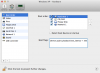
While the Windows XP virtual machine is open but not running, go to the menu bar and select "Virtual Machine" > "Configure...", select "Hardware" from the top of the configuration window that appears, and then select "Boot Order" from the list on the left side of the window. There will be a text box labeled "Boot flags". Copy and paste "devices.audio.playback.host_latency = 100" into that text box.
 

Attachments

  • Boot flags.png
    Boot flags.png
    77 KB · Views: 18
The problem is that audio driver of Thunderbolt display reports that it does support low bitrates but actually fails on playback. The real cure is to fix the emulation _and_ guest drivers to resample in the context of the guest OS (which looks the best from performance point of view), but this is a bit time consuming.

We will do our best to ship fixed driver/emulation in next release.
 
I just upgraded to Build 7.0.15106. I appreciate the update from Parallels Support, but would be great to get this fix. I've been running with messed up sound for more than 8 months.

Also, if my host Mac happens to be playing audi/video when the guest VM plays a sound, all sound becomes distorted. This is really annoying. Really wish the Parallels team would jump on this. I never had such problems when using VMWare Fusion.
 
Back
Top