Windows on Mac: I want only Copy-Paste between the two systems

Hi guys, I need your help in configuring parallels: I've just installed Windows 8.1 and all works great, but I don't want to share all files and discs between the two systems. I tried to enabled the "Isolate" feature, but doing that I can't copy-paste from one system to another. So, my question is: I'm interesting only in the copy-paste feature. I'd like to disable all other sharing stuff. Can you help me doing this configuration? Thank you.
 
Hi Matteo,
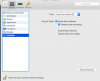
With your VM selected but not turned on select Action-Configure-Options-Sharing - Shared Folders - None - uncheck everything else
Next - Applications - uncheck Share Windows application with Mac
Next - Advanced-Copy & Paste check -Share Mac clipboard and Preserve text formatting
Hopefully this should do what you would like.
Screen Shot 2014-11-30 at 8.00.47 AM.png
 

Attachments

  • Screen Shot 2014-11-30 at 8.00.47 AM.png
    Screen Shot 2014-11-30 at 8.00.47 AM.png
    47.8 KB · Views: 4
Hi Matteo,
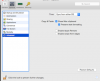
With your VM selected but not turned on select Action-Configure-Options-Sharing - Shared Folders - None - uncheck everything else
Next - Applications - uncheck Share Windows application with Mac
Next - Advanced-Copy & Paste check -Share Mac clipboard and Preserve text formatting
Hopefully this should do what you would like.
View attachment 9640
Perfect, thank you!
 
Back
Top