Peter Loew
Bit poster
I have a 2014 15" Retina MBP (Yosemite), running Parallels 10.2 and Windows 8.1 Pro as a guest OS, which is primarily used to run Microsoft Project 2013 and Microsoft Visio 2013.
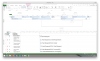
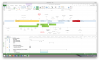
Problem: The timeline view in Microsoft Project 2013 is unreadable / un-viewable due to it looking like it is at an extremely high resolution, as a result everything on the timeline is too small to read and the shapes also seem disjointed and do not connect to each other properly. The rest of the MS Project app looks fine, as do other apps under the Windows OS. My OS X screen resolution is set to 'more space' (1680x1050), and I run the VM in full screen mode (3360x1884). No matter what I set the OS X resolution to, I get the same result in MS Project, likewise if I change the Windows resolution to a lower setting.
I did not have this problem when I had my non Retina MBA. Since my business case for using Parallels is primarily to run MS Project, I really need the timeline view to be workable.
Is there anything else I can try to get this working properly, is it a known bug? I have a colleague with a similar setup to mine, who's using Virtual Box instead, and he doesn't have this problem.
Thanks
Peter
Problem: The timeline view in Microsoft Project 2013 is unreadable / un-viewable due to it looking like it is at an extremely high resolution, as a result everything on the timeline is too small to read and the shapes also seem disjointed and do not connect to each other properly. The rest of the MS Project app looks fine, as do other apps under the Windows OS. My OS X screen resolution is set to 'more space' (1680x1050), and I run the VM in full screen mode (3360x1884). No matter what I set the OS X resolution to, I get the same result in MS Project, likewise if I change the Windows resolution to a lower setting.
I did not have this problem when I had my non Retina MBA. Since my business case for using Parallels is primarily to run MS Project, I really need the timeline view to be workable.
Is there anything else I can try to get this working properly, is it a known bug? I have a colleague with a similar setup to mine, who's using Virtual Box instead, and he doesn't have this problem.
Thanks
Peter