I have a 15" retina MBP.
When I first installed PD 11 and Windows 10, It looked correct on the retina display.
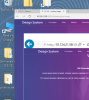
However, once I get to work I connect the MBP to a 27" Thunderbolt display and the UI text, desktop icons, and some UI controls are huge (see screenshot). Actual web page loo normal, but the UI of Internet Explorer is oversized.
I did not have this issue with PD 10 and Windows 8... this is a clean install and leads me to believe I missed a setting somewhere.
When I first installed PD 11 and Windows 10, It looked correct on the retina display.
However, once I get to work I connect the MBP to a 27" Thunderbolt display and the UI text, desktop icons, and some UI controls are huge (see screenshot). Actual web page loo normal, but the UI of Internet Explorer is oversized.
I did not have this issue with PD 10 and Windows 8... this is a clean install and leads me to believe I missed a setting somewhere.