Hi guys,
I'm running the latest version of Parallels 10, and I'm in the Windows Enterprise Evaluation period. I downloaded the .iso from Microsoft, though Parallels didn't recognize it for some reason, so I proceeded by selecting "Windows 10" from the dropdown instead of drag & dropping the .iso.
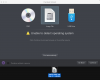
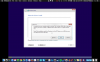
When I get to the Windows 10 installation page, "select the driver to install" running a scan shows nothing. I downloaded the Bootcamp Support Files and put them on a USB drive, but it isn't visible when I click the "browse" button. I went to configure > hardware > USB&Bluetooth and Bluetooth 3.0 is enabled. "Apple USB Host Controller" is also a permanent assignment under the "devices" pane.
I'm running OSX Yosemite 10.10.3 on a new 13-inch Macbook.
How do I install the drivers?
I'm running the latest version of Parallels 10, and I'm in the Windows Enterprise Evaluation period. I downloaded the .iso from Microsoft, though Parallels didn't recognize it for some reason, so I proceeded by selecting "Windows 10" from the dropdown instead of drag & dropping the .iso.
When I get to the Windows 10 installation page, "select the driver to install" running a scan shows nothing. I downloaded the Bootcamp Support Files and put them on a USB drive, but it isn't visible when I click the "browse" button. I went to configure > hardware > USB&Bluetooth and Bluetooth 3.0 is enabled. "Apple USB Host Controller" is also a permanent assignment under the "devices" pane.
I'm running OSX Yosemite 10.10.3 on a new 13-inch Macbook.
How do I install the drivers?