
Alexander6
Bit poster
Hi!
I've got a problem with using Parallels Desktop on my Mac.
The problem description: While i worked with Windows 7 in parallels my Mac was totally frozen. I had to use hard reset. After reset i turned on Parallels and when i chose windows 7 i got an error message:
"A file file of device required for the operation of Hard Disk 0 does not exist of is used by another process, or you have no permission to access it. The virtual machine will continue running, but the device will be disconnected."
After that i started to search for the problem solution and i found the article on your site where i found info that virtual HDD can be used by Finder.
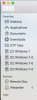
That was right, hdd was used by Finder, but i couldn't extract this hdd, because there was no ejecting icon near hdd.
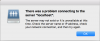
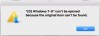
Screenshots you can find in attachments.
Sorry for my English, I'm from Russia.
Please help me to solve this problem.
I've got a problem with using Parallels Desktop on my Mac.
The problem description: While i worked with Windows 7 in parallels my Mac was totally frozen. I had to use hard reset. After reset i turned on Parallels and when i chose windows 7 i got an error message:
"A file file of device required for the operation of Hard Disk 0 does not exist of is used by another process, or you have no permission to access it. The virtual machine will continue running, but the device will be disconnected."
After that i started to search for the problem solution and i found the article on your site where i found info that virtual HDD can be used by Finder.
That was right, hdd was used by Finder, but i couldn't extract this hdd, because there was no ejecting icon near hdd.
Screenshots you can find in attachments.
Sorry for my English, I'm from Russia.
Please help me to solve this problem.
Attachments

Last edited:
