Question is all in Title, here's a screen shot for context http://imgur.com/a/mgi3t
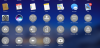
After installing Parallels 12 and Win 10, Launch Pad was littered with icons that I don't want or need.
Holding the Option key doesn't reveal an 'X' by which I can delete them, nor does dragging them to the trash seem to work either. Combinations of CMD+Option also fail to clear these pesky, dull, gray icons.
How can I get rid of these? Also, Parallels I love the app, but my goodness can we not do this? Please respect user space!
After installing Parallels 12 and Win 10, Launch Pad was littered with icons that I don't want or need.
Holding the Option key doesn't reveal an 'X' by which I can delete them, nor does dragging them to the trash seem to work either. Combinations of CMD+Option also fail to clear these pesky, dull, gray icons.
How can I get rid of these? Also, Parallels I love the app, but my goodness can we not do this? Please respect user space!