Coherence issue with iOS Sierra and Parallels 12

MichaelG18

Bit poster
Last Thursday I upgraded my year old Mac to the new iOS Sierra. After it was installed, Coherence mode stopped working. I was using Parallels Version 11. Every Windows (8.11) App that I open shows black where the app should be. If I get out of Coherence mode, the apps appear normal. I thought maybe I needed to upgrade to 12 so I did, but still the same problem. Now also there is a lag when trying to select an app or even when scrolling the mouse, or moving a window around.

Attached is a screen shot in Coherence mode. The black window is Explorer on the left and Outlook on the right. This happens with every windows app I open.
 

Attachments

  • Screen Shot 2016-10-09 at 9.11.01 PM.png
    Screen Shot 2016-10-09 at 9.11.01 PM.png
    733.7 KB · Views: 18
Last edited:
I currently am running Parallels 11 on Mac OS (Sierra) and I can tell you that Coherence does NOT work. I've updated Parallel Tools with no luck.
Can you suggest something else or provide a date when a fix might be available?
 
I currently am running Parallels 11 on Mac OS (Sierra) and I can tell you that Coherence does NOT work. I've updated Parallel Tools with no luck.
Can you suggest something else or provide a date when a fix might be available?
Hi RoverT, make sure you have no viruses. In case a virus has been found, remove Parallels Tools from Control Panel > Add and remove Programs, remove a virus and install Parallels Tools back. If the issue is still present, make sure that Parallels Coherence Service is running inside your virtual machine:
1. Press CMD + R > type services.msc > Hit Return/Enter.
2. Find Parallels Coherence Service in the Services tab and make sure it is in running state.
If it is already running, try restarting it.
If it does not help, Shut down your virtual machine from Actions > Shut Down. Leave it in stopped state for a while and Start.
 
I have a 2017 Macbook Pro 3.1 GHz with Radeon Pro 560 4GB graphics card running macOS Sierra and I've tried all of the above, tried uninstalling, reinstalling, nothing has worked. When I go into coherence mode all the windows turn black on my mac's screen, but work as expected on my external monitor. Any other solutions?
 
I have a 2017 Macbook Pro 3.1 GHz with Radeon Pro 560 4GB graphics card running macOS Sierra and I've tried all of the above, tried uninstalling, reinstalling, nothing has worked. When I go into coherence mode all the windows turn black on my mac's screen, but work as expected on my external monitor. Any other solutions?
Hi @TroyG2, are you using Windows Creator's update build in Parallels Desktop? If not, please let us know how long have you been facing the issue.
 
Hi @TroyG2, are you using Windows Creator's update build in Parallels Desktop? If not, please let us know how long have you been facing the issue.
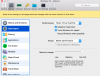
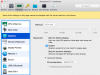
The parallels tech team called me and the solution was to change the power settings to "Better performance" and by optimize the graphic setting for the Windows virtual machine. See my settings in the attached images.
 

Attachments

  • Screen Shot 2017-07-07 at 2.38.19 PM.png
    Screen Shot 2017-07-07 at 2.38.19 PM.png
    103.7 KB · Views: 45
  • Screen Shot 2017-07-07 at 2.38.44 PM.png
    Screen Shot 2017-07-07 at 2.38.44 PM.png
    101.6 KB · Views: 44
Back
Top