Alexander8
Bit poster
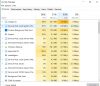
I just installed Parrallels 12, Windows 10 and Office 360 in the VM. A significant portion of all of my resources in the VM are being used as you can see. Also, the CPU usage fluctuates drastically when I'm idle in the VM, but as soon as I start doing something, it shoots up and stays roughly between 50% & 75%
The whole reason I got this, was to work with excel, as I have some pretty vba intensive spreadsheets that I need to work with, but there's no way I could work with it like this. I have a 2015 Macbook Pro 15" with 16gb, so I feel like I should be able to work on some excel spreadsheets at the bare minimum.
I read somewhere to uninstall Windows, but it's an OEM, so I'm afraid if I uninstall it I won't be able to re-install it. Any suggestions on making this run faster would be greatly appreciated.
The whole reason I got this, was to work with excel, as I have some pretty vba intensive spreadsheets that I need to work with, but there's no way I could work with it like this. I have a 2015 Macbook Pro 15" with 16gb, so I feel like I should be able to work on some excel spreadsheets at the bare minimum.
I read somewhere to uninstall Windows, but it's an OEM, so I'm afraid if I uninstall it I won't be able to re-install it. Any suggestions on making this run faster would be greatly appreciated.