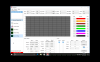
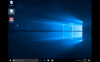
My windows 10 does not fill up all my screen, and then some programs that run on windows 10 don't maximize properly, where I can see the whole screen, or give me the option to scroll down to see it. See photos The one shows how windows doesn't fill out my screen. The other shows how this program has a window that's outside my viewing area. I can make it smaller, but it doesn't give my scroll bars to see the whole program.

Install the app
How to install the app on iOS
Follow along with the video below to see how to install our site as a web app on your home screen.
Note: This feature may not be available in some browsers.
You are using an out of date browser. It may not display this or other websites correctly.
You should upgrade or use an alternative browser.
You should upgrade or use an alternative browser.
windows 10 window size on my mac
- Thread starter CharlieK1
- Start date


Guna@Parallels
Parallels Support
Glad to hear that!Thanks. That did it!
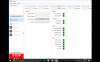
Ok, maybe it only fixed part of the problem. The Windows 10 screen size is okay now, but this program that I'm using -- the window size is taller than my screen, and it doesn't give me scroll bars, so there's no way to see the bottom part of the program window.
No matter what size I make my windows 10 screen, whether full screen, stretched, auto, and even off, or if I manually resize it, the program I'm running in windows resizes, too, where it's always the same size as the windows window. But the bottom of the program window is down in the windows 10 task bar, where I can't get to it...
No matter what size I make my windows 10 screen, whether full screen, stretched, auto, and even off, or if I manually resize it, the program I'm running in windows resizes, too, where it's always the same size as the windows window. But the bottom of the program window is down in the windows 10 task bar, where I can't get to it...