Printing on Windows with generic driver doesn't offer Paper Size option

MichaelG20

Bit poster
Hi,
When I print on Mac, I can choose what paper size I'm using. I can see that when I open the print dialog on my Windows 7 VM (belonging to the generic HP Laserjet driver), there is no option to change the paper size. Is there a solution to this?
Thank you.
 
Hi,
When I print on Mac, I can choose what paper size I'm using. I can see that when I open the print dialog on my Windows 7 VM (belonging to the generic HP Laserjet driver), there is no option to change the paper size. Is there a solution to this?
Thank you.
Hey, could you please provide us with the screenshot from the Windows side?
 
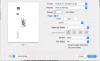
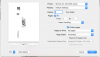
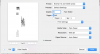
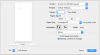
Sure. I attached 3 images of the VM menu - 3 of its sub menus. In the Mac Print Setup photo, you can see that I've set Paper Size to Envelope #10. The Paper Size option doesn't exist on the VM Print Setup menu.
 

Attachments

  • mac print setup.png
    mac print setup.png
    65.5 KB · Views: 4
  • vm print setup - layout.png
    vm print setup - layout.png
    80.5 KB · Views: 4
  • vm print setup - paper handling.png
    vm print setup - paper handling.png
    83.1 KB · Views: 4
  • vm print setup - print settings.png
    vm print setup - print settings.png
    72.1 KB · Views: 4
Sure. I attached 3 images of the VM menu - 3 of its sub menus. In the Mac Print Setup photo, you can see that I've set Paper Size to Envelope #10. The Paper Size option doesn't exist on the VM Print Setup menu.
Thanks a lot for your reply and provided info.
Do you have this issue only with specific docs or with all MS Word docs for example?
 
Back
Top