
Install the app
How to install the app on iOS
Follow along with the video below to see how to install our site as a web app on your home screen.
Note: This feature may not be available in some browsers.
You are using an out of date browser. It may not display this or other websites correctly.
You should upgrade or use an alternative browser.
You should upgrade or use an alternative browser.
Windows Parallels and CAD Dongle
- Thread starter JohnS29
- Start date

Maria@Parallels
Problem solver
Hi, could you please make a screenshot of the warning massage and provide us with it?Parallels seeing dongle as a storage device. I keep getting a warning message appear indicating memory is low. Anyway of removing this as being seen as a storage device. or stop the repeating warning message.

If you noticed that your Windows virtual machine takes a lot of disk space, use this freeware tool to check its contents.Thank you for your quick response.
If you look at the provided picture it is looking at Drive G...Codemeter which is my dongle. It has nothing to do with the size of the virtual drive...well at least for the time being.
Note: You have to install Scanner application mentioned in the second part of the article
Hi Chris sorry for delay in response. I have been away.
I have upped the VM to 1TB. I have a 2.5TB fusion Harddrive. I am still getting the same message appear. As mentioned before I don't think it has anything to do with the VM as such. Windows keeps assuming the dongle (USB key) is a storage device..thus the message I get. Please refer to earlier sent image......John
I have upped the VM to 1TB. I have a 2.5TB fusion Harddrive. I am still getting the same message appear. As mentioned before I don't think it has anything to do with the VM as such. Windows keeps assuming the dongle (USB key) is a storage device..thus the message I get. Please refer to earlier sent image......John

Elric
Parallels Team
Hi, this problem happens also on real hosts, it is not a parallels specific problem.
In discussion at http://archicad-talk.graphisoft.com/viewtopic.php?p=236028 there is a suggestion to disable the message using steps from http://www.addictivetips.com/window...-space-notification-alert-in-windows-7-vista/
In discussion at http://archicad-talk.graphisoft.com/viewtopic.php?p=236028 there is a suggestion to disable the message using steps from http://www.addictivetips.com/window...-space-notification-alert-in-windows-7-vista/
Alright, are you able to disable the message using the steps given in the previous link? Please let us know if you have any issue in the product and we are here to help!Hi Eric thank you for the insight....Looks like I will have to put up with it......Thanks too all that have assisted me with this issue.
Hi @JohnS29, please share the screenshot of the error message so that we will help!tried altering the registry as described. Still no luck...warning message still appearing in windows on parallels
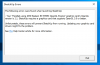
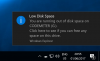
Hi @JohnS29, do you have enough disk space available in Windows virtual machine? If not, please resize the virtual hard disk and keep us posted the results.View attachment 12558 This is the message I get with my dongle inserted. Still have not fixed or found resolution to this issue.