Inaccessible BOOT Device after upgrading to Parallels 12.2.0

PaulD5

Bit poster
After regrettably updating to the latest Parallels Desktop, my once working Windows 10 setup is will not boot anymore. Updating to Parallels is the only change that was made and everything was working fine before that. I have looked and tried some suggestions in the forums with no luck. This is a development environment i use for software and is very important that I can get this up and running. Before I try restores and everything in Windows, I wanted to see if anyone knew anything in Parallels configurations or anything that may have gotten messed up.

Please help me!

Paul
 
I tried those instructions with no luck. The error in that KB article is a bit different from mine...

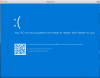
Here is the error I am getting. It is a windows error. The VM appears to be able to boot from Disk, however when Windows 10 is loading, it eventually fails and gets to this point. I have tried a restore however I am getting disk errors where it cannot extract file, etc. I am getting to the point where I may need to try to reinstall windows or something, but I really do not want to have to do this. I can also revert back to an older backed up image I have laying around however it is a bit older and I will lose some stuff. Again, the only thing that was done was update to the recommended version of Parallels. This is quite frustrating.

Paul
 

Attachments

  • Screen Shot 2017-05-02 at 6.09.37 PM.png
    Screen Shot 2017-05-02 at 6.09.37 PM.png
    176.7 KB · Views: 14
After regrettably updating to the latest Parallels Desktop, my once working Windows 10 setup is will not boot anymore. Updating to Parallels is the only change that was made and everything was working fine before that. I have looked and tried some suggestions in the forums with no luck. This is a development environment i use for software and is very important that I can get this up and running. Before I try restores and everything in Windows, I wanted to see if anyone knew anything in Parallels configurations or anything that may have gotten messed up.
Please, reproduce the problem, make virtual machine window active, generate problem report (in Mac application menu go to Help -> Send Technical Data), send it and post report id here.
 
Back
Top