Hello,
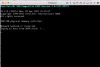
I've ran Windows 7 for a few years using Parallels. I just migrated a Windows 10 PC to Parallels, but when I got to boot it up, it brings up the "configuring your virtual machine" window, then after about 5 minutes that goes away and I see the windows boot up screen (the black page with all the writing) and it is stuck on "trying to boot from SATA Drive #".
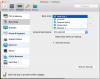
I've tried changing the location of my Hard Disk, I've tried redoing the migration multiple times, but can't get it to work.
Any help would be greatly appreciated.
Thanks
Cade
I've ran Windows 7 for a few years using Parallels. I just migrated a Windows 10 PC to Parallels, but when I got to boot it up, it brings up the "configuring your virtual machine" window, then after about 5 minutes that goes away and I see the windows boot up screen (the black page with all the writing) and it is stuck on "trying to boot from SATA Drive #".
I've tried changing the location of my Hard Disk, I've tried redoing the migration multiple times, but can't get it to work.
Any help would be greatly appreciated.
Thanks
Cade
Last edited: