Host OS: Mac OS X Sierra 10.12.5
Guest OS: Mac OS X Sierra 10.12.5
Parallels: Parallels Desktop 12
Problem:
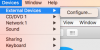
When I connect my bluetooth mouse to my Host OS, it doesn't come up as a device that I can assign to my Guest OS. I want to use my bluetooth mouse as a dedicated mouse for the Guest OS. Can someone please help me solve this problem?
Other pertinent information:
1) I can connect a bluetooth speaker to my Host OS and assign it as a sound output for my Guest OS.
2) I can assign my USB mouse to the Guest OS.
Guest OS: Mac OS X Sierra 10.12.5
Parallels: Parallels Desktop 12
Problem:
When I connect my bluetooth mouse to my Host OS, it doesn't come up as a device that I can assign to my Guest OS. I want to use my bluetooth mouse as a dedicated mouse for the Guest OS. Can someone please help me solve this problem?
Other pertinent information:
1) I can connect a bluetooth speaker to my Host OS and assign it as a sound output for my Guest OS.
2) I can assign my USB mouse to the Guest OS.