I'm using a Macbook Air Mid 2014 (Core i5, 4Gb RAM). Since 2014 I've been used Parallels virtual machine with Windows 7 installed, and it worked perfect almost 3 years in the configuration OS X Maverick + Parallels 10. Used mostly for software development needs and cross-compilation OS X+Windows.
About 2 months ago I decided to update both OS X and Parallels Desktop to configuration Parallels 12+Sierra. Also SSD has been encrypted.
It picked up all virtual machines without problems, but it appears that enormous CPU usage makes comfortable work in guest OS almost impossible. Project that compiled 5-7 minutes now takes 20-25 minutes to complete. Video in almost every player I tried is freezing as well.
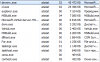
Activity monitor reports CPU usage more than 200% (both cores I suppose), see screenshot attached.
I've heard about an issue with external drives that could slow virtual machine down, but for me it does not affect performance at all, it still consumes CPU with or without external drives attached to the virtual machine.
Could it be software issue? Or related to full-disk encryption?
About 2 months ago I decided to update both OS X and Parallels Desktop to configuration Parallels 12+Sierra. Also SSD has been encrypted.
It picked up all virtual machines without problems, but it appears that enormous CPU usage makes comfortable work in guest OS almost impossible. Project that compiled 5-7 minutes now takes 20-25 minutes to complete. Video in almost every player I tried is freezing as well.
Activity monitor reports CPU usage more than 200% (both cores I suppose), see screenshot attached.
I've heard about an issue with external drives that could slow virtual machine down, but for me it does not affect performance at all, it still consumes CPU with or without external drives attached to the virtual machine.
Could it be software issue? Or related to full-disk encryption?