How to install driver for Parallels Display Adapter

SuehaA

Bit poster
I have just installed Parallels12 on a new Macbook Pro retina. And installed W10 on it.
In Windows side I cannot change the display resolution, its fixed to 1024x768
When I look at the graphics driver settings it reads: Microsoft basic display adapter
How to install Parallels display adapter?
 
Guys - same issue; I have the Toolbox installed but Windows 10 still has the default Basic Display Adapter installed (versus, presumably, the Parallels one?) - any guidance? Windows 10 is - per the OP - stuck in 1024x768.
Cheers!
 
Hey! Thanks for getting back

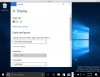
Here's Display Settings in Windows 10 - resolution dropdown greyed out...

upload_2017-7-10_10-28-23.png

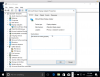
...and here's Device Manager, showing (generic) MS Basic Display Adapter installed - usually the cause of being stuck in 1024x768.

Attempts to install a Parallels display adapter have so far failed - perhaps I don't have the correct driver?

Cheers!

upload_2017-7-10_10-28-17.png
 
Ah - don't worry; ignore that. Simply installed the Parallels Tools - per the above reply - to the VM itself (rather than to my Mac) and the Windows 10 VM is changing resolution just fine.
Cheers!
 
Hey! Thanks for getting back

Here's Display Settings in Windows 10 - resolution dropdown greyed out...

View attachment 12674

...and here's Device Manager, showing (generic) MS Basic Display Adapter installed - usually the cause of being stuck in 1024x768.

Attempts to install a Parallels display adapter have so far failed - perhaps I don't have the correct driver?

Cheers!

View attachment 12673
How can we change the graphic adapter in parallel??
 
Back
Top