
Install the app
How to install the app on iOS
Follow along with the video below to see how to install our site as a web app on your home screen.
Note: This feature may not be available in some browsers.
You are using an out of date browser. It may not display this or other websites correctly.
You should upgrade or use an alternative browser.
You should upgrade or use an alternative browser.
Windows 10 gray screen
- Thread starter RichelleM
- Start date
Arun@Parallels
Parallels Support
Hi @RichelleM , please help us with the screenshots, we will check and help you out.

Arun@Parallels
Parallels Support
Hi @RichelleM , please try Actions > Reset and check if that works.
After I took the screen shot, things just started happening. I let it run it's course but now it is just spinning, and says "Continuing". Under Actions, the only non grayed out option for me is Resume and it is checked. I tried to attach a screen shot but it got a message that it was too big Sorry, I am clearly in over my head here.
Alfena@Parallels
Pro
Hello @RichelleM ,
Please follow the steps provided at http://kb.parallels.com/6338 to terminate virtual machine and then restart Windows and check if it works
Thanks
Please follow the steps provided at http://kb.parallels.com/6338 to terminate virtual machine and then restart Windows and check if it works
Thanks
Glad to know that. You're welcome. Please get back to us for any further queries. Thanks!This was helpful. I think my problem is fixed. Thank you
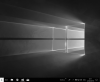
Refer to the article and resolve the issue. This issue is resolved in the latest build of Parallels Desktop 13.Hi, I had the same problem when I do command + C to copy text , screen turns grey. Sometimes turns back normal if I keep doing command + C couple of times.
Hi,I have same problem and I cheked the link and applied all the steps in in my computer but nothing changed.What I can do?Hello @RichelleM ,
Please follow the steps provided at http://kb.parallels.com/6338 to terminate virtual machine and then restart Windows and check if it works
Thanks

Maria@Parallels
Problem solver
Hello,Hi,I have same problem and I cheked the link and applied all the steps in in my computer but nothing changed.What I can do?
please provide us with your Parallels Desktop and macOS version?