"Install Parallels Tools" missing from the Actions menu

  • Thread starter Thread starter Parallels User
  • Start date Start date
P

Parallels User

Hi there,
I am running Parallels Desktop 13 for Mac, Pro Edition, v13.0.1, and have Windows 10 installed in a VM. When I start this VM and look at the Actions menu to try and install Parallels Tools as indicated in http://kb.parallels.com/en/115835 the menu option to do so is missing:
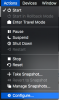
Screen Shot 2017-09-21 at 11.06.17 AM.png
How can I fix this?

Thanks.
 
Hello NathanT1. Please take a snapshot. Then, when in Windows, press Command+R to launch the Run window. In this window, type '%temp%' (without the quotes) and hit Enter. In the folder that appears, navigate to the folder 'PrlToolsPackages' and run the file named 'Setup' located within. From the wizard that appears, install Parallels Tools and then check whether or not the said option is still missing.
 
Hi, I face exactly same issue. Parallels 13 for Mac with Debian 3.16.43 on virtual machine. No "Install Parallels Tools" in Actions menu. How can I run the wizard without it?
 
Hi same problem with windows 10 when i type in %temp% it brings up the folder in the screenshot attached there is no folder called PrlToolsPackages
 
Hi same problem with windows 10 when i type in %temp% it brings up the folder in the screenshot attached there is no folder called PrlToolsPackages
Refer to article and follow steps in second scenario to mount ISO then install Parallels Tools from CD/DVD Drive in My Computer/This PC.
 
ok thanks got it running now , it actually kept crashing after 10% of install using PTAgent.exe , when i clicked on autorun though it worked .
now the problem i have is trying to play a game , Halo wars i get an error screen to do with the graphic driver , saying its out of date ,see screenshot
ive tried updating through device manager but that says its up to date , im not sure its the most graphics intensive game so cant see why it wouldnt work .
please help
 

Attachments

  • Screenshot at Oct 22 15-03-05.png
    Screenshot at Oct 22 15-03-05.png
    50 KB · Views: 1
ok thanks got it running now , it actually kept crashing after 10% of install using PTAgent.exe , when i clicked on autorun though it worked .
now the problem i have is trying to play a game , Halo wars i get an error screen to do with the graphic driver , saying its out of date ,see screenshot
ive tried updating through device manager but that says its up to date , im not sure its the most graphics intensive game so cant see why it wouldnt work .
please help
We are glad that you are able to complete Parallels Tools installation but when we checked system requirements of Halo Wars it shows one of its minimum requirement is DirectX 11. Currently, Parallels Desktop only supports DirectX 9 and 10.
 
thats disappointing as my mac is on DirectX 12 ! when will Parallels catch up ? i bought Parallels thinking i could get rid of my windows pc
 
answered my own question looks like others have been asking for this since 2015 .......................
Hi DavidT16, while Parallels strives to provide the best Mac virtualization platform, Parallels Desktop for Mac is subject to a host operating system and its limitations. Unfortunately, macOS does not support OpenGL Compute Shaders which are required to implement DirectX 11 support, meaning we are currently unable to create this functionality.

We maintain a good relationship with Apple and have discussed the aforementioned concerns with them. We closely monitor any API Reference documentation changes at developer.apple.com in the hopes of receiving the required instructions from Apple, but we do not have them as of yet. Please rest assured that we do want to implement better graphics support for guest systems, and once we have the necessary documentation, we will create the functionality to do so.
 
after typing %temp% I see no folder 'PrlToolsPackages'. Where do I download the parallels tools from?
 
Back
Top