
Install the app
How to install the app on iOS
Follow along with the video below to see how to install our site as a web app on your home screen.
Note: This feature may not be available in some browsers.
You are using an out of date browser. It may not display this or other websites correctly.
You should upgrade or use an alternative browser.
You should upgrade or use an alternative browser.
I can not access Drive File Stream (Google Drive) from my Windows 10 in Parallels
- Thread starter ElenaF
- Start date
This is my versión Parallels Desktop Home Edition 13.1.1 (43120) on macOS Sierra 10.12.6 (16G1036)
Thanks!
Please follow as suggested below:
1.Please disable sharing by unchecking the radio box as given in this article
2.Please click on Actions(On the Mac menu bar) > Reinstall Parallels Tools.
3.Then now enable sharing as suggested at http://kb.parallels.com/6912 and check if this works. Thanks!
I've done this and it did not work :-(
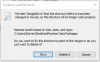
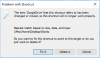
Please send us the screenshot of the sharing tab in your configuration settings. Thanks!

P
Parallels User
FYI I've got this working now.
I just went to Devices/Sharing/Add Folder from within the VM and added it from there. It's now accessible as before
I just went to Devices/Sharing/Add Folder from within the VM and added it from there. It's now accessible as before
Thank you! This method works perfectly!FYI I've got this working now.
I just went to Devices/Sharing/Add Folder from within the VM and added it from there. It's now accessible as before
We are glad to hear that the issue is resolved. Feel free to reach out to us anytime for support.That was easy! Thanks works perfect.
It appears as though one must allow sharing of Custom Folders as accessed in Sharing settings for Parallels to do this (see image below). Just add a folder to the list, migrate to your Google File Stream's location and click Open (which really means Select). Then it will appear in the list. Now you should be able to see it in your VM properly. Even the demo version!
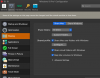
It appears as though one must allow sharing of Custom Folders as accessed in Sharing settings for Parallels to do this (see image below). Just add a folder to the list, migrate to your Google File Stream's location and click Open (which really means Select). Then it will appear in the list. Now you should be able to see it in your VM properly. Even the demo version!
View attachment 17108
Hello Larry,
How did you access that page in your screen shot? I am having a hard time figuring out where to access the Sharing Settings for Parallels.
Thanks.
Go to the Parallels menu.Hello Larry,
How did you access that page in your screen shot? I am having a hard time figuring out where to access the Sharing Settings for Parallels.
Thanks.
Select Control Center.
Click the gear icon for your VM to access its Configuration settings.
On the window that appears, click the Options tab (it has an icon of vertical sliders and to the right of the General settings tab).
Click Sharing on the left side of the window.
Click the Custom Folders button on the right side of the window (you might need to click "Share Mac" above it first).
Click the PLUS button (+) to add a folder you want to share to the VM from your Mac.
Navigate to the Drive folder (or other folder you want to share).
Click Open (which should really say "Select" instead, IMO).
You should now see that folder has been added to the list of shared folders.
Click OK.
You _might_ need to restart your VM to see the changes.
I hope that helps!