VM on Bootcamp partition fails: EFI message

GuidoG1

Bit poster
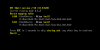
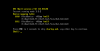
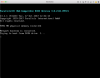
Parallel Desktop fails to create VM of Windows 10 (1703) in the BootCamp partition of my Mac. I receive the EFI error showed in the enclosed screenshot.
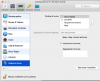
I used the instructions of the article 122735 (Unable to start Virtual Machine - EFI Boot) but I do not find the "Use EFI Boot" option (look at the enclosed screenshot). Please Help me.
Guido
 

Attachments

  • Schermata 2017-10-26 alle 10.28.53.png
    Schermata 2017-10-26 alle 10.28.53.png
    232.6 KB · Views: 33
  • Schermata 2017-10-26 alle 10.21.26.png
    Schermata 2017-10-26 alle 10.21.26.png
    127.3 KB · Views: 35
version 13.1.1
Hi @GuidoG1, please follow the steps mentioned below to fix the issue:
1. Go to virtual machines list, find your converted machine and right-click it. Select 'Show in Finder'.
2. In the newly opened Finder window, right-click the .pvm file and select 'Show package contents'
3. In the newly opened folder, find 'config.pvs' file. Copy it to the Desktop (as a measure of backup).
4. Edit the original 'config.pvs' (using TextEdit), find this line: '1' (no quotes).
5. Change it to '0' (no quotes). Save the file.
 
there are a lot of lines containing '1' (no quotes), which one?
Hi guidoG1, please reproduce the issue and collect a fresh Problem Report:
1. Control-click/tap using two fingers on Parallels Desktop icon in Dock > Help > Send Technical Data.
2. Wait for the Problem Report to be generated.
3. On the appeared Problem Report window please write a short problem description (scenario) and enter your contact information (name and email address) - then click Send Report.
4. Reply us back with 9-digit Problem Report ID.
 
Please, I did not have any solution for my problem. I need to utilize Parallel Desktop on my BootCamp partition!
 
Got the same Problem. Any Solution? My ID: 223122269
Hi @AndreasR3, this issue might have occurred due to the Partition boundaries are not recognized correctly on the disk. File system may or may not be damaged.
To fix the issue, please follow the steps provided mentioned below:

1. Check Windows hard disk for errors as described in this article.
2. Start Parallels Desktop without starting you Boot Camp based virtual machine.
3. In the menu bar choose Actions > Configure > Hardware > Boot Order > Advanced Settings and in Boot flags insert:
devices.sfilter.enable=0
4. Now choose Hard Disk > Edit Partitions > EFI partition should be added.
 
Here is the screenshot of the failed process to start BootCamp partitionView attachment 13158
Hi @GuidoG1, please reproduce the issue and collect a fresh Problem Report:
1. Control-click/tap using two fingers on Parallels Desktop icon in Dock > Help > Send Technical Data.
2. Wait for the Problem Report to be generated.
3. On the appeared Problem Report window please write a short problem description (scenario) and enter your contact information (name and email address) - then click Send Report.
4. Reply us back with 9-digit Problem Report ID.
 
After reinstalling BootCamp and trying to start it in Parallels I still got the same message. Trying your Article shows me the screen attached to this entry. So still no success. New ID this time: 226015034
 

Attachments

  • Bildschirmfoto 2017-11-19 um 16.51.07.png
    Bildschirmfoto 2017-11-19 um 16.51.07.png
    78.1 KB · Views: 10
After reinstalling BootCamp and trying to start it in Parallels I still got the same message. Trying your Article shows me the screen attached to this entry. So still no success. New ID this time: 226015034
Hi @AndreasR3,
1. Make sure that your virtual machine is turned off.
2. In the list of virtual machines, select the one you want.
3. Right-click> VM's Configuration > Hardware> Boot Order> Uncheck "Use EFI Download"
4. Start the virtual machine.
 
Ive seen this "Uncheck Use EFI Download" somewhere bevor and tried it, but its not there actually. There is no checkbox. Still stuck with the same message like in my last post.
 
Switch to VMWare Fusion 10, works great with bootcamp and as a vm. I'm still having issues trying to get bootcamp up and running again with Parallels 13.2. Sick of this b.s.
 
Not to bash Parallels support, but geeze. Posting something like 10 completely different series of steps for "solutions", some of them incredibly vague (there was never an answer to what the heck "search for a 1" meant in one of the suggestions, I assume it means to toggle some random boolean value, of which the config file probably has tons of, yet that subject just got dropped entirely) and some of them referencing using options that don't even exist in the UI. Sounds like an attempt to support a product you don't actually use yourself? Or bad feedback from a dev working behind the scenes who is extremely out of touch with how the actual customer-facing release software works and behaves.

What a mess Parallels 13 has become. Not worth it.
 
Another new install of Windows 10. And still the same message. Any new suggestions?
Hi @AndreasR3, the report ID shows that you are not using the latest build of Parallels Desktop 13 for Mac. we released a new update Parallels Desktop 13 for Mac Update 2 Hotfix 1(13.2.0-43213) and this update addresses this issue. To check for updates, click on the Parallels Desktop menu on Mac menu bar and select Check for Updates: http://kb.parallels.com/124262
 
Back
Top