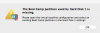
The Boot Camp partition used by hard disk 1 is missing

JanC4

Bit poster
Hi, Im Jan from Sweden. I have a problem and need help.
After I upgraded my macOS to the new High Sierra version I can't start my Parallels Desktop.
The message Iam getting is: "The Boot Camp partition used by hard disk 1 is missing",
What do I need to do for to fix the problem?

I'm not so good at to fix problems like this, so please give me all information I need.
Sorry for my bad english. Hope you can understand what I wrote.

Best Regards,
JanSkärmavbild 2017-10-04 kl. 11.00.23.png
 
Hello @JanC4 , please follow as suggested below:

Disable System Integrity Protection (SIP).

1.Restart the Mac, on Apple logo loading screen press CMD + R to boot into Recovery.

2.In Recovery, on Mac menu bar locate Utilities menu > open Terminal application.

3.Type in the commands below one-by-one:

csrutil disable

reboot

4.Back in a normal mode remove the existing machine or create the new one, depending on the customer's scenario.

5.Boot macOS into Recovery again and enable SIP back running the following Terminal commands:

csrutil enable

reboot.
Please see if this works. Thanks!
 
Hi Alfena
I have the same problem as JanC4. I have followed the above instructions up to point 4. When back in normal mode Boot Camp opens and windows loads. However because I don't know what to do in point 4, after I complete point 5 it stops working again.

I have selected 'New' then selected 'Add Existing Virtual Machine', then 'My Boot Camp.pvm' and Open. But nothing happens, then after point 5 it still doesn't work giving the same error.

Can you please explain how to 'remove the existing machine or create the new one'

Thanks
Alan
 
I have the same problem now with Mac OS X High Sierra. Using Parallels Desktop 11. What do we do? It's not acceptable to force us to update to Parallels 13 and pay for it when we already have version 11.
 
Hi Harvey, I agree; but as you say what can we do? It is not like version 11 is that old. I did update to version 13 but now can not update the OS or Parallels in case one of the updates stops it working again.
 
I was asking if Parallels is working for an update to 11 to work on High Sierra. I know for sure that upgrading to Parallels 13 will work with the new macOS, but I'm not ready to spend several bucks for that version at this time. I will try to install the 13's trial version as suggested above, only if there's confirmation that no current work is being done to fix 11 at this time (for sure the trial will expire at some time).
 
Ahh I understand now. You might have to post the question again to have someone from Parallels answer. As far as I know they are not working on an update to resolve the issue. As you can see above, Shathish just said install Parallels 13.
 
Back
Top