I have cloned my Hard Disk to a larger capacity drive and now Parallels does not recognise the Bootcamp partition. I can still boot either Windows or MAC from startup. I have uninstalled Parallels and reinstalled a fresh installation. When following the guidance on how to install Windows from an existing Bootcamp installation when I get to the Hardware tab after custom configuration the bootcamp option is greyed out and says no bootcamp partitions although I know one exists as Finder can see and browse that partition.

Install the app
How to install the app on iOS
Follow along with the video below to see how to install our site as a web app on your home screen.
Note: This feature may not be available in some browsers.
You are using an out of date browser. It may not display this or other websites correctly.
You should upgrade or use an alternative browser.
You should upgrade or use an alternative browser.
MAC Bootcamp - Cloned HD now Parallels can't see Bootcamp
- Thread starter IanS8
- Start date

Dmitry Geynisman
Parallels Team
Hi Ian, by any chance, have you used Winclone to clone your Boot Camp to a new disk?I have cloned my Hard Disk to a larger capacity drive and now Parallels does not recognise the Bootcamp partition. I can still boot either Windows or MAC from startup. I have uninstalled Parallels and reinstalled a fresh installation. When following the guidance on how to install Windows from an existing Bootcamp installation when I get to the Hardware tab after custom configuration the bootcamp option is greyed out and says no bootcamp partitions although I know one exists as Finder can see and browse that partition.
Hi Dimitry, No I used Acronis True Image to make a backup and then installed on the new hard disk. I had to do something to get Bootcamp to work again but it was before Xmas and I have slept since then. It could not have been very difficult otherwise I would have remembered in more detail.
Cheers
Ian
Cheers
Ian
Dmitry Geynisman
Parallels Team
Thanks, Ian. Please re-create a Boot Camp virtual machine (remove current one, create a new via Installation Assistant), start it - if it fails to start - please go to Help menu > Send Technical Data... > please post the report ID here.Hi Dimitry, No I used Acronis True Image to make a backup and then installed on the new hard disk. I had to do something to get Bootcamp to work again but it was before Xmas and I have slept since then. It could not have been very difficult otherwise I would have remembered in more detail.
Cheers
Ian
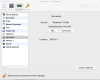
Hi Dmitry, I do not get to the end of the Wizard as Parallels cannot see the BootCamp, see attached
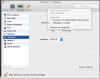
The current Hard Disk is a 750GB Seagate SSD and the Crucial 512GB SSD shown above was the first clone from the original 512GB HD. The Crucial SSD is not fitted in the laptop.
Thanks
Ian
The current Hard Disk is a 750GB Seagate SSD and the Crucial 512GB SSD shown above was the first clone from the original 512GB HD. The Crucial SSD is not fitted in the laptop.
Thanks
Ian
Attachments
Dmitry Geynisman
Parallels Team
Thanks for the information, Ian. Unfortunately, it won't work. We support Boot Camp installed via Apple's Boot Camp Assistant only. We do not officially support booting from physical bootable devices yet, but we research possibilities to add this feature to future Parallels Desktop updates.Hi Dmitry, I do not get to the end of the Wizard as Parallels cannot see the BootCamp, see attached
View attachment 13629
The current Hard Disk is a 750GB Seagate SSD and the Crucial 512GB SSD shown above was the first clone from the original 512GB HD. The Crucial SSD is not fitted in the laptop.
Thanks
Ian
Hi Dmitry, It is an official BootCamp installation, just for some reason Parallels does not recognise it as one. Parallels was working fine before the clone and I did not change or add any other software, just moved everything to a new HD. When I boot the Laptop holding down the "alt" key I go to the standard Bootcamp screen with options to start Windows or Mac OS. From Finder I can see the MACHINTOSH HD and the BOOTCAMP HD as my two installed drives. Thanks
Ian
Ian
Dmitry Geynisman
Parallels Team
I just noticed on your screenshot that Parallels Desktop version is an "old" one. Is it Parallels Desktop 11 or 10? Can you please send us a technical report via Help menu?Hi Dmitry, It is an official BootCamp installation, just for some reason Parallels does not recognise it as one. Parallels was working fine before the clone and I did not change or add any other software, just moved everything to a new HD. When I boot the Laptop holding down the "alt" key I go to the standard Bootcamp screen with options to start Windows or Mac OS. From Finder I can see the MACHINTOSH HD and the BOOTCAMP HD as my two installed drives. Thanks
Ian
HI Dmitry, I have just sent the report, I am using Version 10. I remembered how I cloned the Hard Disk now, I used Acronis True Image 2017 Version 3.3.8035 to make a back up and then restored onto the new hard disk. I came across my old hard disk and the backup on my portable hard disk.
Cheers
Ian
Cheers
Ian
Dmitry Geynisman
Parallels Team
Hi Ian, cannot confirm for 100% that it will work, but please try Parallels Desktop 13 trial version to see if it works for your environment. There were a lot of changes in the product since Parallels Desktop 10.Hi Dmitry,
Any update on my issue, I am considering purchasing the latest version if it will fix my problem.
Thanks
Ian
Hi Dmitry, When I loaded version 13 the new version found two Windows pvm or pro files (sorry did to write down) One was Windows 7 which was the one from my last attempt, the other said Old Bootcamp. I tried the old Bootcamp and this one worked OK so I deleted the other one which seemed to be the default. A few weeks ago there was a special deal I was emailed. Can I still go for this as I see I can't upgrade from version 10 to 13.
Thanks
Ian
Thanks
Ian
Dmitry Geynisman
Parallels Team
Hi Ian, glad to hear that worked. The deal had ran out, unfortunately. You need to purchase a new license for Parallels Desktop 13 for Mac.Hi Dmitry, When I loaded version 13 the new version found two Windows pvm or pro files (sorry did to write down) One was Windows 7 which was the one from my last attempt, the other said Old Bootcamp. I tried the old Bootcamp and this one worked OK so I deleted the other one which seemed to be the default. A few weeks ago there was a special deal I was emailed. Can I still go for this as I see I can't upgrade from version 10 to 13.
Thanks
Ian