I am unable to create any new VMs because Parallels is crashing immediately upon launching an installation. I have tried multiple known-good ISOs, with the same result every time. Is this issue being addressed? If I cannot create new VMs, I am dead in my tracks. Please fix this!

Install the app
How to install the app on iOS
Follow along with the video below to see how to install our site as a web app on your home screen.
Note: This feature may not be available in some browsers.
You are using an out of date browser. It may not display this or other websites correctly.
You should upgrade or use an alternative browser.
You should upgrade or use an alternative browser.
Parallels 14.1.3 crashes creating VMs under Mac OS 10.14.4
- Thread starter MatthewH8
- Start date

Maria@Parallels
Problem solver
Did you get any error message before crashing?I am unable to create any new VMs because Parallels is crashing immediately upon launching an installation. I have tried multiple known-good ISOs, with the same result every time. Is this issue being addressed? If I cannot create new VMs, I am dead in my tracks. Please fix this!
Also could you please reproduce the issue and generate the problem report right after that and reply us back with the report's ID.
Please check this KB article for more info about the tech.report
Marcos Grandi
Bit poster
Hi, I had the same issue.
I had to reinstall Parallels in order to be able to create new VMs again.
I had to reinstall Parallels in order to be able to create new VMs again.
The same issue for me. After the crash, I suspend the VM and resume and after that guest OS starting to install.
This is the part of error message from macOS:
System Integrity Protection: enabled
Crashed Thread: 0 Dispatch queue: com.apple.main-thread
Exception Type: EXC_BAD_ACCESS (SIGSEGV)
Exception Codes: KERN_INVALID_ADDRESS at 0x000000000000002c
Exception Note: EXC_CORPSE_NOTIFY
Termination Signal: Segmentation fault: 11
Termination Reason: Namespace SIGNAL, Code 0xb
Terminating Process: exc handler [52035]
This is the part of error message from macOS:
System Integrity Protection: enabled
Crashed Thread: 0 Dispatch queue: com.apple.main-thread
Exception Type: EXC_BAD_ACCESS (SIGSEGV)
Exception Codes: KERN_INVALID_ADDRESS at 0x000000000000002c
Exception Note: EXC_CORPSE_NOTIFY
Termination Signal: Segmentation fault: 11
Termination Reason: Namespace SIGNAL, Code 0xb
Terminating Process: exc handler [52035]
Any suggestions on how to fix that?Did you get any error message before crashing?
Also could you please reproduce the issue and generate the problem report right after that and reply us back with the report's ID.
Please check this KB article for more info about the tech.report
guilhermem3
Bit poster
Same happening here. Tried both CentOS and Debian ISO images and they crash. Downloading the pre-built VMs work.
Reinstalled and same thing. Uninstalled and installed again, the same thing. Sent a Parallels report already because sometimes it shows up.
Parallels 14.1.3 (45485) and macOS 10.14.4.
Please fix.
Reinstalled and same thing. Uninstalled and installed again, the same thing. Sent a Parallels report already because sometimes it shows up.
Parallels 14.1.3 (45485) and macOS 10.14.4.
Please fix.
AlexandreN2
Bit poster
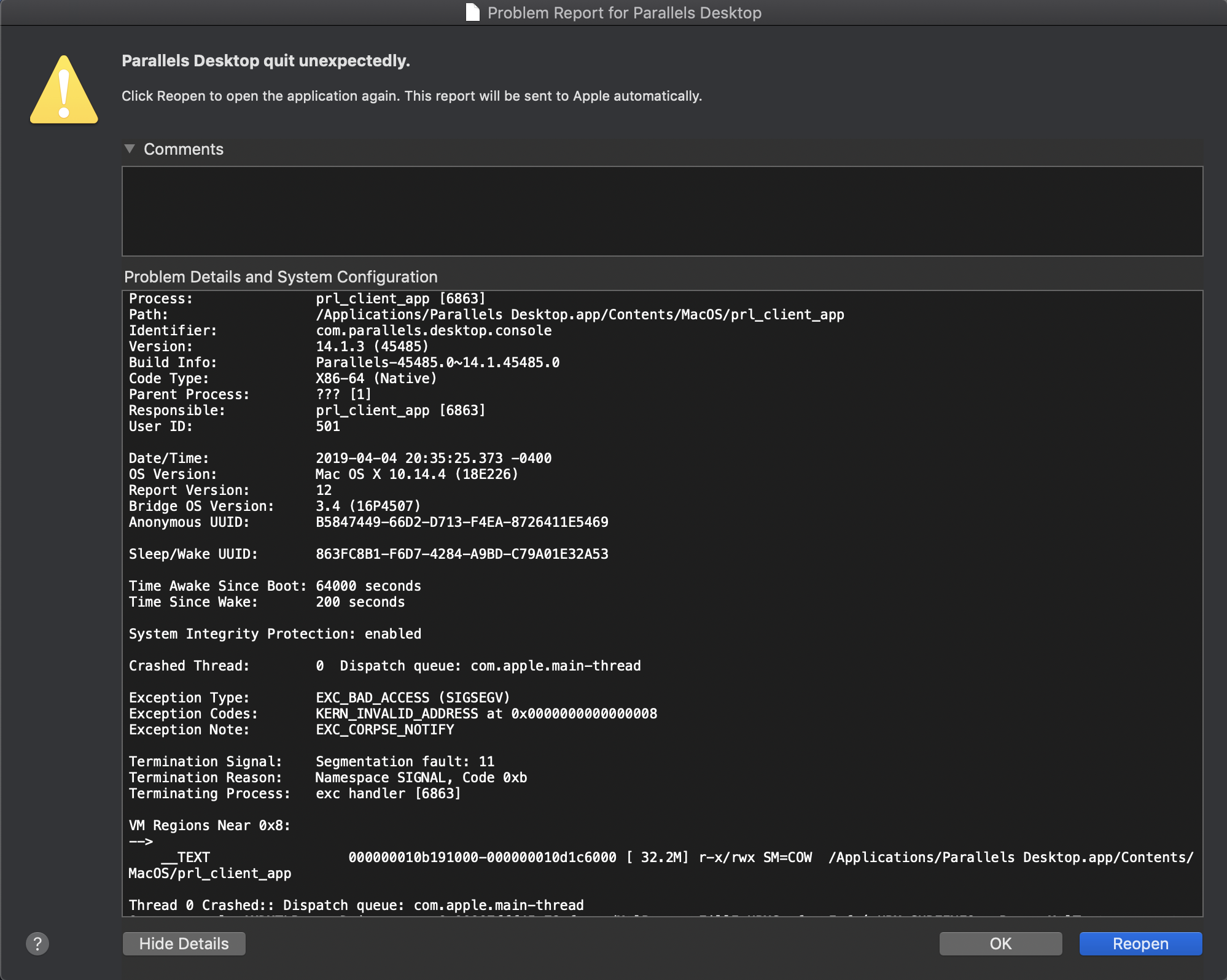
I have been facing the same issue here:
prl_client_app
Crashed Thread: 0 Dispatch queue: com.apple.main-thread
Exception Type: EXC_BAD_ACCESS (SIGSEGV)
Exception Codes: KERN_INVALID_ADDRESS at 0x0000000000000008
Exception Note: EXC_CORPSE_NOTIFY
Termination Signal: Segmentation fault: 11
Termination Reason: Namespace SIGNAL, Code 0xb
Terminating Process: exc handler [42334]
I also generate the crash report and I already sent it, this the report ID 307534829.
How can we fix that?
prl_client_app
Crashed Thread: 0 Dispatch queue: com.apple.main-thread
Exception Type: EXC_BAD_ACCESS (SIGSEGV)
Exception Codes: KERN_INVALID_ADDRESS at 0x0000000000000008
Exception Note: EXC_CORPSE_NOTIFY
Termination Signal: Segmentation fault: 11
Termination Reason: Namespace SIGNAL, Code 0xb
Terminating Process: exc handler [42334]
I also generate the crash report and I already sent it, this the report ID 307534829.
How can we fix that?
guilhermem3
Bit poster
So Parallels will just ignore this thread?
In macOS 14.4.4 there is a regression causing several application failures.
Here is an example: https://github.com/feenkcom/gtoolkit/issues/258
I do not have any clue if this is related, by it might be.
Here is an example: https://github.com/feenkcom/gtoolkit/issues/258
I do not have any clue if this is related, by it might be.
I was able to install it in the end, but it is true, that I tried it several times. I am not sure what I changed in the last successful iteration. I guess that I used https://gfx.io and set macOS using integrated card (or the other one?) only as the Mac OS 10.14.4 regression is related to OpenGL.