For work I must run Microstation v8i SSE3, everything work fine and it also quite fast, but once problem is there: Shade mode in visualisation style not work. When I turn this option display freeze - not redrawed / artefacts occurs. I try set VM Configuration > Hardware > Video > 3D acceleration to DirectX9 and this help, with this setting it work, but ...microstation is much much slower. Shade mode is important for me, because Venturis (add-on) it need for fine output...

Install the app
How to install the app on iOS
Follow along with the video below to see how to install our site as a web app on your home screen.
Note: This feature may not be available in some browsers.
You are using an out of date browser. It may not display this or other websites correctly.
You should upgrade or use an alternative browser.
You should upgrade or use an alternative browser.
Microstation and Shademode
- Thread starter JurajM
- Start date
Manu@Parallels
Guest
Hello JurajM,
Please refer http://kb.parallels.com/122708 and http://kb.parallels.com/122485 this articles might help you in re-configuring virtual machine video settings.
Let us know if issue persist.
Please refer http://kb.parallels.com/122708 and http://kb.parallels.com/122485 this articles might help you in re-configuring virtual machine video settings.
Let us know if issue persist.
I try this, but same situation - https://www.dropbox.com/s/gmlwxn5phzl902s/MS_DX10.png?dl=0 - just see artefacted ACS (x,y,z) - not content.
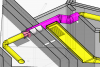
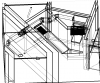
After today morning (16/10/2019) update parallels stop working shademodes again. It "works", but they are just BW. Not color. I send this info to support. But have anyone similar problem? Wireframe modes run in color. But all "filled" mode is just B/W.
Color is from yesterday. BW is after morning Update.
Color is from yesterday. BW is after morning Update.
Attachments

serv
Forum Maven
Juraj, with Microstation running and showing b/w drawing please submit a problem report (https://kb.parallels.com/en/9058) and post report id here.
As an experiment, add "video.metal=0" (without quotes) to VM Config > Hardware > Boot order > Advanced settings > Boot flags. Will it make a difference?
As an experiment, add "video.metal=0" (without quotes) to VM Config > Hardware > Boot order > Advanced settings > Boot flags. Will it make a difference?
serv
Forum Maven
If you re-install Parallels Desktop 15.0 from here https://download.parallels.com/desktop/v15/15.0.0-46967/ParallelsDesktop-15.0.0-46967.dmg will the colored view work again?
 have same idea - beceause with wireframe model isn't posible work - found local old Version 15.0.0 (46967) - just installing.
IvanD@Parallels
Parallels Team
Hello JurajM,It works - everything is color again - I make data report - look at ID 324444650. There is attached screenshot.
We released an update for Parallels Desktop 15 which resolves the issue you reported. Download it and update Parallels Tools afterward to resolve the issue with Microstation app.
 great. thank you. downloading. try it and report. Probably later - evening.
Raymond@Parallels
Parallels Support
Hi, the report you mentioned is for Parallels Toolbox - please check this article for a fix https://kb.parallels.com/124770O sorry, but after install this update, parallels tools (installed in windows) crashed - ID325475058.
Did Parallels Tools crash as well? Fail to install, show any error message?