Winload.efi is missing and This virtual machine has one or more hard disks with 4 KB logical sectors

Xennof

Bit poster
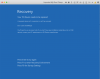
I have a MacBook Pro 2017 with Parallels 13 installed. I created a boot camp partition and then imported it into Parallels. Was working fine for a while but now I'm getting a blue screen of death with the with a warning saying "Your PC/device needs to be repaired"

It says the file "\windows\system32\winload.efi" is missing with the error code "0xc0000225"
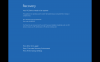
Screenshot 2020-01-08 at 18.20.02.png

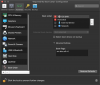
I shut down my imported bootcamp and disabled the efi boot by entering the boot flag "vm.bios.efi=0"
Now when I try to load My Imported Boot Camp it tells me that "This virtual machine has one or more hard disks with 4 KB logical sectors" and therefore requires an efi boot. Is there a way to get around this?
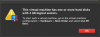
Screenshot 2020-01-08 at 18.19.46.png

Screenshot 2020-01-08 at 18.40.43.png
 
Hi was wandering if there is any solution to this as I have something similar. I purchased Parallel for exactly the feature that enables you to connect to your boot camp windows without rebooting. And even more to convert boot camp win 10 to Parallel as vm machine so I can remove boot camp and reclaim space. However as much as first part is working well, and I can open win10 boot camp from within Parallel Control center, the second part throws the same error after import and unable to invoke any of the F1, F8 and only option that works is Enter. that does nothing.
 

Attachments

  • Screen Shot 2020-04-17 at 3.36.31 PM.png
    Screen Shot 2020-04-17 at 3.36.31 PM.png
    278.9 KB · Views: 5
Unfortunately, I got no help from Parallels. If I remember right I found a way of fixing it in these forums if you haven't deleted your Bootcamp partition, but I did delete it.
I have gotten around it, but the way I got around it was deleting "My Imported Boot Camp" from my computer, deleting and reinstalling parallels, getting a fresh copy of windows and installing it directly through parallels. The downside is that I lost the data on that imported Bootcamp, but luckily enough I didn't have anything overly important on that section. If I did I wouldn't have been able to access it anyway since it wouldn't even load up.
 
That sucks, I mean likely it would work if I just start installing a new windows 10, but my boot camp is already activated and have it configured. At least I did not delete my boot camp windows so eventually I can use it through parallels control center from mac. Many people with the same issue and parallel still advertise it like it is working no problem. They don't even acknowledge the issue as nothing comes up when searching for this error.
 
Hi did this get resolved?
I still have my bootcamp partition. Was hoping to import and remove it, but the imported bootcamp VM just gives error code 0xc0000225
 
Hi did this get resolved?
I still have my bootcamp partition. Was hoping to import and remove it, but the imported bootcamp VM just gives error code 0xc0000225
Hello, this issue is under investigation with Parallels Engineering Team.
Once we get any updates we will let you know.
Thank you for your time.
 
Back
Top