I am trying to bring in a Boot Camp partition on an external hard disk into Parallels 15.
How can this be done?
I have read through several Knowledge base posts (for example, https://kb.parallels.com/en/123314 and https://kb.parallels.com/113658) which show how to do it, but they always have an option for "Use Windows from Boot Camp" when File>New is selected.
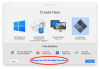
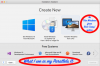
On my Parallels 15 (Pro edition version 15.1.4), no such option is available.
I attach the following screen captures to show the problem:
How can this be done?
I have read through several Knowledge base posts (for example, https://kb.parallels.com/en/123314 and https://kb.parallels.com/113658) which show how to do it, but they always have an option for "Use Windows from Boot Camp" when File>New is selected.
On my Parallels 15 (Pro edition version 15.1.4), no such option is available.
I attach the following screen captures to show the problem: