Not able to Allow "Parallels International GmbH"

TylerG3

Bit poster
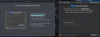
I am attempting to update my Parallels Desktop on Mac, and am stuck. See screen:
upload_2020-5-22_9-58-15.png
Instructions are to open Security Preferences and allow "Parallels International GmbH" but I am unable to do so. Please help get this resolved. Do not even know how to revert to old version to get it working, I am stuck.
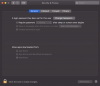
 
I'm having the same issue, the following did not resolve it:
  • Restarting Mac
  • Reinstalling Parallels
  • Granting Full Disk Access in the Privacy tab
  • Allowing apps downloaded from 'Anywhere'
upload_2020-5-22_21-20-42.png
 
This is happening each time that I update Parallels. It first occurred when I went from 14 to 15 and now again when I tried to upgrade to a v.16 maintenance release
MacOS Catalina
 
This is happening each time that I update Parallels. It first occurred when I went from 14 to 15 and now again when I tried to upgrade to a v.16 maintenance release
MacOS Catalina
Hello, did you try the suggestion above?
Also as a possible solution please change the Hypervisor to Apple at VM configurations -> CPU tab -> advanced settings.
 
Back
Top