Installed PD16, System Preferences hangs

marcantoniom

Bit poster
After installing Parallels Desktop 16, on Big Sur beta 5, it is now impossible to open System Preferences / Security & Privacy to [Allow] the Parallels kernel extension.

Security & Privacy doesn't open anymore. It is now impossible to [Allow] anything, or otherwise open the preference pane "Security & Privacy".
 
After installing Parallels Desktop 16, on Big Sur beta 5, it is now impossible to open System Preferences / Security & Privacy to [Allow] the Parallels kernel extension.
Security & Privacy doesn't open anymore. It is now impossible to [Allow] anything, or otherwise open the preference pane "Security & Privacy".
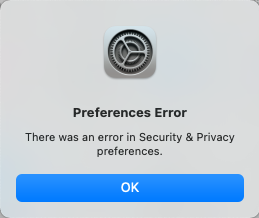
Hello, did you get any error/warning message when you trying to open "System preferences"?
 
After updating to 16.0.1 (48919) on macOS Big Sur 11.0 Beta (20A5364e), I get a crash when going into Security & Privacy to approve the new software from Parallels. The error is "Preference Error - There was an error in Security & Privacy preferences."

Parallels works, I can use Win10 just fine...
 
After updating to 16.0.1 (48919) on macOS Big Sur 11.0 Beta (20A5364e), I get a crash when going into Security & Privacy to approve the new software from Parallels. The error is "Preference Error - There was an error in Security & Privacy preferences."
Parallels works, I can use Win10 just fine...
Hello, Parallels Desktop works OK, but you still have an error message, right?
 
I have the same issue. Also, I can't launch any VM's that are NOT the Windows VM. Please tell me there is a fix for this. I am running the latest Big Sur Beta and Parallels 16.0.1....thanks!

Here is the error I get....

pref_error.png
 
Here is the error I get....

pref_error.png
FYI...Here is the system log for this crash:


Sep 11 08:44:52 Michaels-MacBook-Pro-2 com.apple.preference.security.remoteservice[8180]: objc[8180]: Class AWDSecurityPrefAutoUnlockSetup is implemented in both /System/Library/PreferencePanes/Security.prefPane/Contents/XPCServices/com.apple.preference.security.remoteservice.xpc/Contents/MacOS/com.apple.preference.security.remoteservice (0x10f65f768) and /System/Library/PreferencePanes/Security.prefPane/Contents/MacOS/Security (0x112a90750). One of the two will be used. Which one is undefined.
Sep 11 08:44:55 Michaels-MacBook-Pro-2 com.apple.xpc.launchd[1] (com.apple.preference.security.remoteservice[8180]): Service exited due to SIGILL | sent by exc handler[8180]
Sep 11 08:44:56 Michaels-MacBook-Pro-2 com.apple.xpc.launchd[1] (com.apple.mdworker.shared.09000000-0400-0000-0000-000000000000[8150]): Service exited due to SIGKILL | sent by mds[107]
Sep 11 08:44:56 Michaels-MacBook-Pro-2 com.apple.xpc.launchd[1] (com.apple.mediaanalysisd[8000]): Service exited with abnormal code: 1
Sep 11 08:44:58 Michaels-MacBook-Pro-2 com.apple.xpc.launchd[1] (com.apple.mdworker.shared.10000000-0100-0000-0000-000000000000[8153]): Service exited due to SIGKILL | sent by mds[107]
Sep 11 08:45:05 Michaels-MacBook-Pro-2 com.apple.xpc.launchd[1] (com.apple.mdworker.shared.01000000-0100-0000-0000-000000000000[8158]): Service exited due to SIGKILL | sent by mds[107]
 
I don't know what exactly fixed it, but I no longer have the problem.

Amongst things I did were to 1) reinstall PD16, and then PD16.0.1; 2) I unlocked Preferences by going into Startup Disk, clicking the lock to make changes, and then I went into Security & Privacy; and 3) I rebooted a number of time.

All throughout this PD16 worked fine, and I could start up my VMs, and all of a sudden I no longer get the error when I go into Security & Privacy.
 
I am also suffering from the Preferences Error since updating from PD 16.0 to PD 16.0.1. Simple shutdown / restart did not help.
 
I was able to fix the System Preferences / Security & Privacy issue by deleting (renaming) the following file:

/Library/SystemExtensions/db.plist​

.. note that you might need to disable SIP.
 
That is strange, /Library/SystemExtensions/db.plist was last changed end of August, when I installed the Profile that whitelists the Parallels SystemExtension, and the ID for the extension did not change, or did it???
 
And an hour later I can open S&P again, very strange. Now I need to allow the updated System Extension from Parallels, but that will only be active after a restart. Hello? Apple?
 
Back
Top