
I'm seeing a strange little white tab (well, actually, it's a very light blue) at the left side of the screen in every full-screen VM:
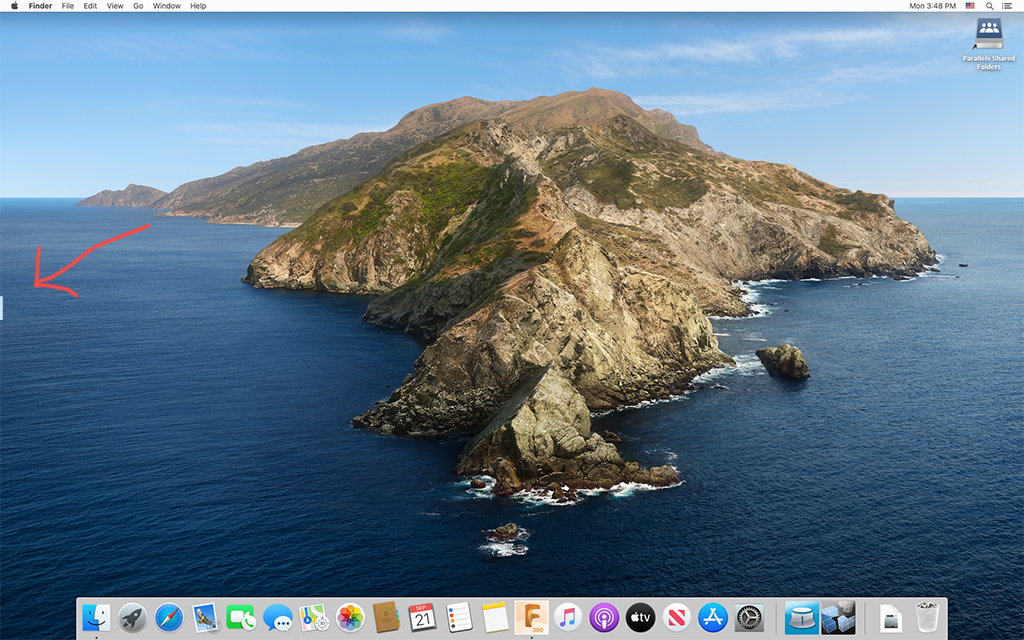
Details:
The behavior is so consistent and intentional-looking that I almost suspect that the tabs are some kind of feature. But as far as I can tell, they have no actual function, and I wasn't able to find any reference to them in the documentation.
Are these supposed to be there, and is there any way to turn them off?
Details:
- Host OS: MacOS Big Sur beta 7
- Parallels version: 16.0.1
- Guest OS: doesn't matter
- Tab is actually exterior to the guest VM and doesn't show up in screenshots (image above is a composite)
- Tab is always the same size
- Tab appears in every full-screen guest OS
- Tab disappears in non-full-screen mode
- Every guest OS's tab is at a different height (but always at the left edge of the screen)
- Tab doesn't respond to clicks, right-clicks, or dragged documents
- Full-screen MacOS apps other than Parallels VMs do not display tabs
The behavior is so consistent and intentional-looking that I almost suspect that the tabs are some kind of feature. But as far as I can tell, they have no actual function, and I wasn't able to find any reference to them in the documentation.
Are these supposed to be there, and is there any way to turn them off?
