
Install the app
How to install the app on iOS
Follow along with the video below to see how to install our site as a web app on your home screen.
Note: This feature may not be available in some browsers.
You are using an out of date browser. It may not display this or other websites correctly.
You should upgrade or use an alternative browser.
You should upgrade or use an alternative browser.
usb flash drive doesn't appear in xp
- Thread starter ksultan
- Start date

sandro
Parallels Developers
hi,
how did you determine that your drive connected into guest OS? Whether did corresponding to your device item from Devices->USB Parallels menu group present and checked sign on it (on the left side of item)? If not you need to select this item in view of attaching device into guest Win XP.
how did you determine that your drive connected into guest OS? Whether did corresponding to your device item from Devices->USB Parallels menu group present and checked sign on it (on the left side of item)? If not you need to select this item in view of attaching device into guest Win XP.
ksultan said:i have the latest version of parallels and xp is guest os,
using macbookpro
when i connect flash drive i see it in the bottom right corner of parallel screen at the usb icon,
it is checked (connected)
but when i go to windows xp my computer i dont see the drive listed ?
Hello,
1. Please check Parallels build. It should be either 3214 or 4560 (5144) (Parallels Desktop menu - About Parallels Desktop). Have you already installed Parallels Tools via the "Actions" menu?
2. Please click on the start menu and choose "Run...", type devmgmt.msc, click OK. Do you see the disk under the Disk Drives submenu? A screenshot of the window is appreciated (apple+shift+3)
Best regards,
John
I am having the same symptom as ksultan. I'm running 4560. Here's a screenshot:
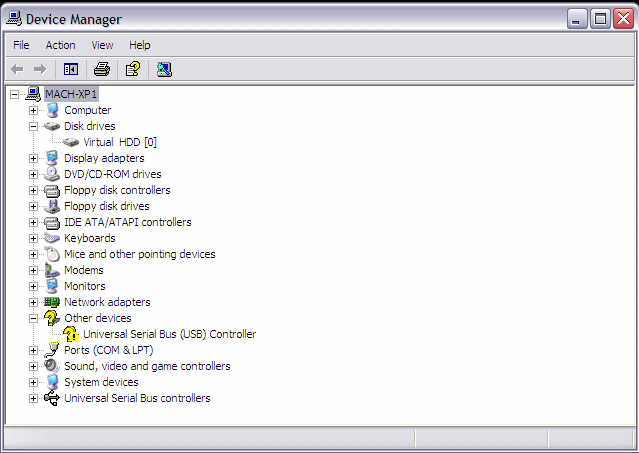
As you can see, there's a problem with USB. Windows notes that "The drivers for this device are not installed. (Code 28)". I've been wary of changing anything though, because I am currently able to (usually) sync my Treo via USB and that's the one thing that really needs to work.
Edit: MacBook Pro, OS X v10.4.10, WinXP Pro SP2
As you can see, there's a problem with USB. Windows notes that "The drivers for this device are not installed. (Code 28)". I've been wary of changing anything though, because I am currently able to (usually) sync my Treo via USB and that's the one thing that really needs to work.
Edit: MacBook Pro, OS X v10.4.10, WinXP Pro SP2
Last edited:
flash drives not appearing for several builds now
I had no problems with USB flash drives until about 2 builds ago - one reason why I bought Parallels in preference to Fusion.
USB dongles for forensic software (FTK) show up fine, as they always have. Been through all the numbers - many times - and the drive shows as connected on the USB device list - but - no love in my computer. What's up?
my .o2 for development: I'm more interested in dependability than feature creep.
I had no problems with USB flash drives until about 2 builds ago - one reason why I bought Parallels in preference to Fusion.
USB dongles for forensic software (FTK) show up fine, as they always have. Been through all the numbers - many times - and the drive shows as connected on the USB device list - but - no love in my computer. What's up?
my .o2 for development: I'm more interested in dependability than feature creep.
Hi i just bought a macbook 2.0ghz
I installed parallels 4568 and am running XP
I tried to connect my USB jump drive but XP will not read nor detect that there is a drive connected
I tried going to device manager and enabling usb and it still wont detect it
I tried to reinstall the usb drivers by putting the XP disc in but it couldnt install the drivers
what am i doing wrong?
what should i do?
I installed parallels 4568 and am running XP
I tried to connect my USB jump drive but XP will not read nor detect that there is a drive connected
I tried going to device manager and enabling usb and it still wont detect it
I tried to reinstall the usb drivers by putting the XP disc in but it couldnt install the drivers
what am i doing wrong?
what should i do?
m7792, hello,
at first try to unplug and plug the device again several times. It it doesn't help, try to do the following:
1. Start Windows guest OS , go to "Start" -> "Control Panel" -> "System" -> "Device Manager" and uninstall all devices under the "Universal Serial Bus Controllers" (right-click the devices).
2. Shut down your VM.
3. In VM Configuration Editor, delete the USB Controller and start Windows guest OS again.
4. Wait 5-10 minutes until Windows finishes the driver setup.
5. Shut down Windows.
6. Add "USB Controller" back to your VM configuration and start Windows again.
If it doesn't work, please, write me back.
Best regards,
Alicia.
at first try to unplug and plug the device again several times. It it doesn't help, try to do the following:
1. Start Windows guest OS , go to "Start" -> "Control Panel" -> "System" -> "Device Manager" and uninstall all devices under the "Universal Serial Bus Controllers" (right-click the devices).
2. Shut down your VM.
3. In VM Configuration Editor, delete the USB Controller and start Windows guest OS again.
4. Wait 5-10 minutes until Windows finishes the driver setup.
5. Shut down Windows.
6. Add "USB Controller" back to your VM configuration and start Windows again.
If it doesn't work, please, write me back.
Best regards,
Alicia.
Similar Problem
When I boot up XP, it goes through and says new hardware found, which includes a few items as well as USB. It then pops up a window that says Install New Hardware, and wants me to insert the cd that has the drivers for the USB, but I have no such cd. Do you have any suggestions for getting this to work? Thanks
When I boot up XP, it goes through and says new hardware found, which includes a few items as well as USB. It then pops up a window that says Install New Hardware, and wants me to insert the cd that has the drivers for the USB, but I have no such cd. Do you have any suggestions for getting this to work? Thanks
Me Three...
I also had this problem. After installing the parallels tools...I too had the unknown USB controller in the device manager. I simply right-clicked it and select install driver... choose 'install automtically'..let it search..it found the intel usb driver and all is well now.
I also had this problem. After installing the parallels tools...I too had the unknown USB controller in the device manager. I simply right-clicked it and select install driver... choose 'install automtically'..let it search..it found the intel usb driver and all is well now.
VizionQuest
Bit poster
Tried Suggestion, Didn't Work
I tried this and it didn't work Alicia. Do you have any other suggestions.
m7792, hello,
at first try to unplug and plug the device again several times. It it doesn't help, try to do the following:
1. Start Windows guest OS , go to "Start" -> "Control Panel" -> "System" -> "Device Manager" and uninstall all devices under the "Universal Serial Bus Controllers" (right-click the devices).
2. Shut down your VM.
3. In VM Configuration Editor, delete the USB Controller and start Windows guest OS again.
4. Wait 5-10 minutes until Windows finishes the driver setup.
5. Shut down Windows.
6. Add "USB Controller" back to your VM configuration and start Windows again.
If it doesn't work, please, write me back.
Best regards,
Alicia.
I tried this and it didn't work Alicia. Do you have any other suggestions.
VizionQuest
Bit poster
my specs
Oh, and I have the latest build (5160) for Parallels 3. I am using a 4GB SanDisk Micro Cruzer flash drive with U3 technology. Please advise, thank you!
I tried this and it didn't work Alicia. Do you have any other suggestions.
Oh, and I have the latest build (5160) for Parallels 3. I am using a 4GB SanDisk Micro Cruzer flash drive with U3 technology. Please advise, thank you!
VizionQuest
Bit poster
have latest build doesn't work
I have the latest build (5160) of Parallels 3 and I can't get my 4GB SanDisk Micro Cruzer with U3 technology to even show up on Windows XP. Can you provide a possible solution please? Thank you!
Hello,
1. Please check Parallels build. It should be either 3214 or 4560 (5144) (Parallels Desktop menu - About Parallels Desktop). Have you already installed Parallels Tools via the "Actions" menu?
2. Please click on the start menu and choose "Run...", type devmgmt.msc, click OK. Do you see the disk under the Disk Drives submenu? A screenshot of the window is appreciated (apple+shift+3)
Best regards,
John
I have the latest build (5160) of Parallels 3 and I can't get my 4GB SanDisk Micro Cruzer with U3 technology to even show up on Windows XP. Can you provide a possible solution please? Thank you!
VizionQuest
Bit poster
Hello,
VizionQuest, what version of MacOS do you have?
Best regards,
Alicia.
I just got my Mac a few days ago. It came with Leopard if that helps. Here's the link:
http://store.apple.com/1-800-MY-APP...1314002/wo/m92ZWypYD00Q3V9559d1CsrROay/2.?p=0