Hi,
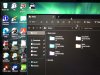
While using the "Optimize for Games" setting for the mouse, there's a visual bug while dragging windows. A "ghost image" of the cursor is left behind showing where the cursor was before dragging the window, and persists until letting the mouse go. It looks as though the Windows mouse doesn't track with the underlying MacOS mouse while dragging. I don't want to set the mouse to "Auto-detect for Games" because I don't like how the mouse whips me in a random direction when entering a game. Funny enough, enabling pointer trails seems to make the window-dragging bug go away, but I don't really want to use pointer trails, lol. A screenshot doesn't show both cursors at once, so I attached a physical photo.
While using the "Optimize for Games" setting for the mouse, there's a visual bug while dragging windows. A "ghost image" of the cursor is left behind showing where the cursor was before dragging the window, and persists until letting the mouse go. It looks as though the Windows mouse doesn't track with the underlying MacOS mouse while dragging. I don't want to set the mouse to "Auto-detect for Games" because I don't like how the mouse whips me in a random direction when entering a game. Funny enough, enabling pointer trails seems to make the window-dragging bug go away, but I don't really want to use pointer trails, lol. A screenshot doesn't show both cursors at once, so I attached a physical photo.