Hiding macOS desktop shortcuts from Windows and vice-versa?

RichardB52

Bit poster
Just installed this yesterday and everything is running fine, but the one issue I'm having that's driving me mad is I don't want the desktop icons from my macOS visible in Windows, nor do I want the desktop shortcuts I created in Windows visible when I return to macOS.
Is there a simple solution to this that I haven't figured out yet?
I'm using Parallels Desktop 18 (latest version) on a 2020 MacBook Pro M1.
Any help is appreciated.
 
I don't have it up and running to glance at, but there's a setting in the VM where you can choose to share between the host and guest. You can choose certain folders and such. I think it's in the second tab of that menu.
 
Just installed this yesterday and everything is running fine, but the one issue I'm having that's driving me mad is I don't want the desktop icons from my macOS visible in Windows, nor do I want the desktop shortcuts I created in Windows visible when I return to macOS.
Is there a simple solution to this that I haven't figured out yet?
I'm using Parallels Desktop 18 (latest version) on a 2020 MacBook Pro M1.
Any help is appreciated.
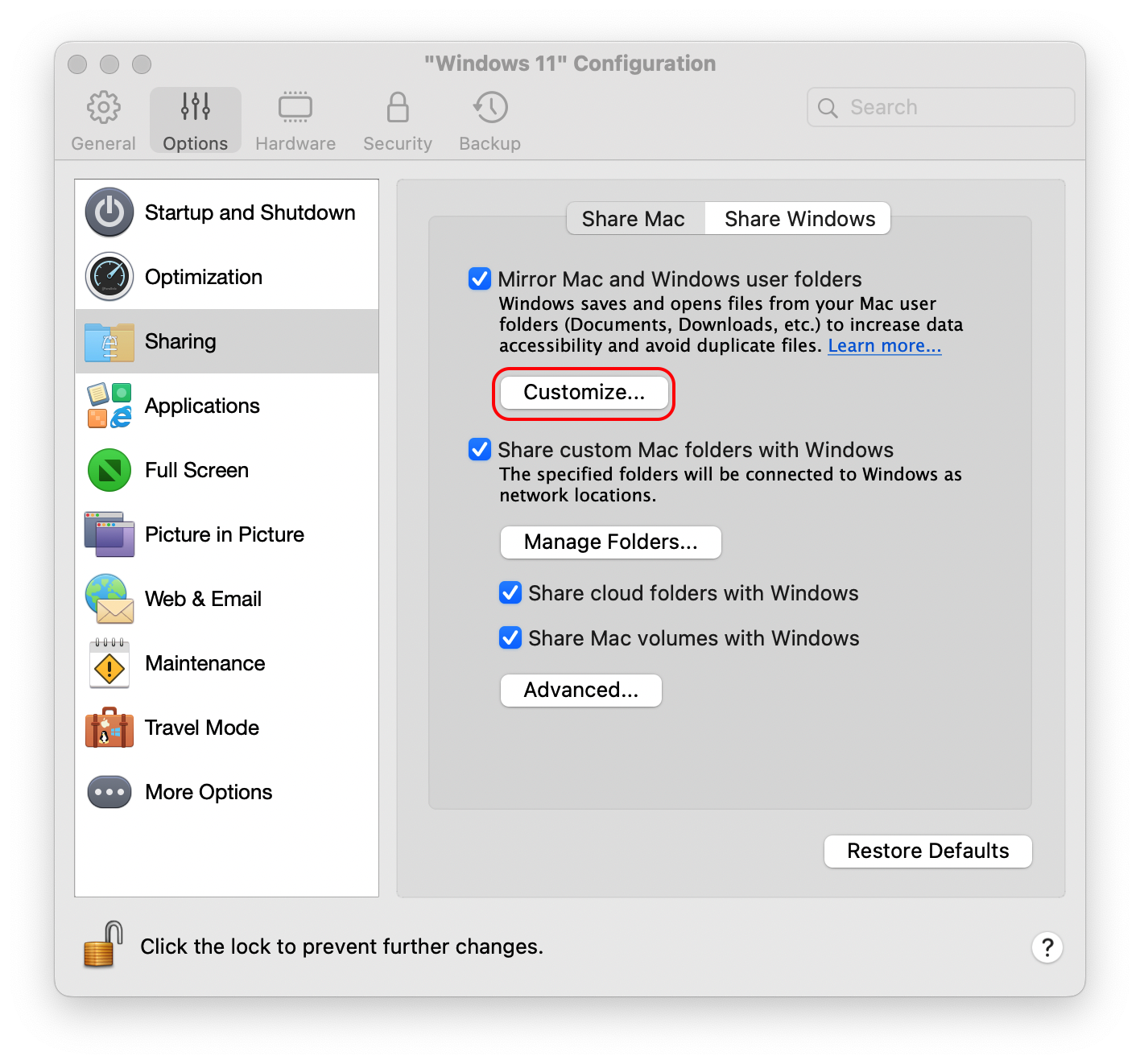
Hello,
By default, Parallels Desktop shares files from your Mac Desktop, Downloads, Documents, Pictures, Music, and Movies folders with Windows, which brings amazing convenience and data safety when you work with Windows on your Mac.
The feature is called Shared Profile.
If you wish to disable this option, kindly follow the below steps:
1. Open your virtual machine's configuration ( see: https://kb.parallels.com/117287 ) > Options > Sharing.
2. Uncheck sharing settings (uncheck the box "Mirror Mac and Windows user Folders") according to your preferences under "Share Mac".
Kindly refer to this article for more information: https://kb.parallels.com/en/6912
Thank you.
 
Hello,
By default, Parallels Desktop shares files from your Mac Desktop, Downloads, Documents, Pictures, Music, and Movies folders with Windows, which brings amazing convenience and data safety when you work with Windows on your Mac.
The feature is called Shared Profile.
If you wish to disable this option, kindly follow the below steps:
1. Open your virtual machine's configuration ( see: https://kb.parallels.com/117287 ) > Options > Sharing.
2. Uncheck sharing settings (uncheck the box "Mirror Mac and Windows user Folders") according to your preferences under "Share Mac".
Kindly refer to this article for more information: https://kb.parallels.com/en/6912
Thank you.
Thank you, this is what I was looking for, sort of. I have desktop shortcuts in MacOS that I don't want to see in Windows, but doing what you instructed didn't eliminate them, and deleting them in Windows also deletes them on my MacOS desktop. Why does it have to be this way?
 
Hello,
Normally, the sharing option is activated by default, and disabling this option should normally have stopped the sharing.
When the Sharing Option is on, deleting file/shortcut on one side will be replicated on the other side.
For us to better help this issue, kindly collect a technical report (right-click Parallels icon in Dock > Help > Send technical data > check "Attach screenshots..." > press Send Report) and provide us with the report's 9-digit ID in reply to this post.
Thanks
 
I looked at their links above and this image helps the most:
Screenshot%202022-08-05%20at%2015.05.47.png

Basically, in both the Windows and Mac tabs, you'll want to uncheck each thing while the VM is off. The next time you go in, you should see the folders / drives gone entirely from the VM.
 
I looked at their links above and this image helps the most:
Screenshot%202022-08-05%20at%2015.05.47.png

Basically, in both the Windows and Mac tabs, you'll want to uncheck each thing while the VM is off. The next time you go in, you should see the folders / drives gone entirely from the VM.

That's what I wanted! Thanks so much for your help, I'm good now!
 
Back
Top