Menu Bar Disappears When VM window is large

MichaelM149

Bit poster
Hello! I'm testing Parallels before I buy and I've encountered a big problem. After installing Parallel Tools in the VM (Ventura) when the VM window exceeds a certain size the text on the Menu Bar disappears. All menu options are still present, but they cannot be seen.

Hardware: 2020 Intel iMac
Host OS: Ventura 13.5.1
Guest OS: Ventura 13.5.1
Parallel Version: Parallels Desktop 18
Technical data report number: 433635184

Before Resize
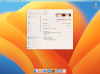
BeforeResize.png

After resize
AfterResize.png
 
Hello! I'm testing Parallels before I buy and I've encountered a big problem. After installing Parallel Tools in the VM (Ventura) when the VM window exceeds a certain size the text on the Menu Bar disappears. All menu options are still present, but they cannot be seen.

Hardware: 2020 Intel iMac
Host OS: Ventura 13.5.1
Guest OS: Ventura 13.5.1
Parallel Version: Parallels Desktop 18
Technical data report number: 433635184

Before Resize
View attachment 21090

After resize
View attachment 21092
Hello,

Thank you for your feedback.
Recently, Parallels Desktop has been updated to version 19.0

To resolve the issue, we advise you to install the latest version of Parallels Desktop 18:

1. Right-click the Parallels Desktop icon in Dock > Check for updates.

2. Follow on-screen instructions.

3. Reinstall Parallels Tools.

4. Restart the Virtual Machine,

If the issue reoccurs, collect an additional technical report (click Parallels icon || > Help > Send technical data > check "Attach screenshots..." > press Send Report) and send the report's 9-digit ID in a reply to this e-mail.
 
Back
Top