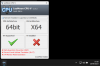
I need to find a Solution to use LDplayer (or similar) within Windows 11 on my Mac M2 max.
When I install LDplayer it asks me to activate VT (Virtual Technology) in Windows...
In the past, you could activate this in Parallels Desktop, I have used it on my old Intel mac
How can I enable Virtualization (VT) on Windows in Parrallels 19 ???
This is very important to my business, it's one of the reasons why I bought Parallels Desktop
When I install LDplayer it asks me to activate VT (Virtual Technology) in Windows...
In the past, you could activate this in Parallels Desktop, I have used it on my old Intel mac
How can I enable Virtualization (VT) on Windows in Parrallels 19 ???
This is very important to my business, it's one of the reasons why I bought Parallels Desktop