PD18/19 - Windows 11: Border Color in Coherence Mode

Nemensi

Member
For windows in Coherence mode, the Windows custom color for title bars and borders is not used. No matter which color is selected, the window frame is always drawn in gray. This results in an unattractive look, especially in the title bar area. In normal window/full screen mode, the window frames look as expected.

Frames in Window Mode:
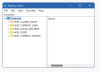
0 - Window Mode.png
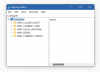
Frames in Coherence Mode:
1 - Coherence Mode.png
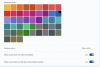
Windows Settings:
2 - Windows Settings.png
 
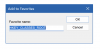
There is another glitch with the frame border of modal dialog boxes in Coherence mode.
RegEdit.exe - Favorites - Add to Favorites (Window Mode):
3 - RegEdit - Add to Favorite - Window Mode.png
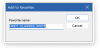
The same dialog in Coherence mode:
4 - RegEdit - Add to Favorite - Coherence Mode.png
 
Hello @Nemensi
Kindly reproduce the issue and provide us with a technical report (click Parallels icon || > Help > Send technical data > check "Attach screenshots..." > press Send Report) and send us the report's 9-digit ID.
Thanks!
 
Hello @Nemensi
Kindly reproduce the issue and provide us with a technical report (click Parallels icon || > Help > Send technical data > check "Attach screenshots..." > press Send Report) and send us the report's 9-digit ID.
Thanks!
Hello Trishna,
here is the report ID: 441087298
This should be easy to reproduce on your systems.
 
Hello.

Thank you for the provided information, we have escalated this issue, with the data to our Development Team for further investigation.
 
Back
Top