
Install the app
How to install the app on iOS
Follow along with the video below to see how to install our site as a web app on your home screen.
Note: This feature may not be available in some browsers.
You are using an out of date browser. It may not display this or other websites correctly.
You should upgrade or use an alternative browser.
You should upgrade or use an alternative browser.
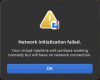
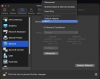
Any users having issues with the new Macbook Air with M5 and N1 network chip?
- Thread starter EmergeA
- Start date
gadgetboyj
Bit poster
Have you tried switching to Shared networking before booting the VM, if you're not already using it? Seems several of us are having trouble with bridged networking on these new M5 Airs.
JonathanR16
Bit poster
I have a new Macbook M5 Pro and I cannot get bridged network working. I'm about to pull my hair out.
I'm having the same issue with my M5 Max. Need bridged networking for some of the apps I use - for now having to use a spare laptop.


Hello,
This is a known issue currently being investigated by our Development Team.
Once there is a response from them - whether it is a request for additional information, a workaround, or a permanent fix - we will let you know.
In addition, you may also subscribe to the following article (Click Get Updates -> Subscribe) to be notified when the new update is released and see the list of changes.
Thank you.
This is a known issue currently being investigated by our Development Team.
Once there is a response from them - whether it is a request for additional information, a workaround, or a permanent fix - we will let you know.
In addition, you may also subscribe to the following article (Click Get Updates -> Subscribe) to be notified when the new update is released and see the list of changes.
Thank you.
silvertuna
Bit poster
Same issue here. M5 Pro.
P
Parallels User
>>> Message has been deleted by the user <<<

Trishna Oobeyram
Staff member
Hello,
This is a known issue currently still being investigated by our development team.
Once there is a response from them - whether it is a request for additional information, a workaround, or a permanent fix - we will let you know.
In addition, you may also subscribe to the following article (Click Get Updates -> Subscribe) to be notified when the new update is released and see the list of changes.
Thank you.
This is a known issue currently still being investigated by our development team.
Once there is a response from them - whether it is a request for additional information, a workaround, or a permanent fix - we will let you know.
In addition, you may also subscribe to the following article (Click Get Updates -> Subscribe) to be notified when the new update is released and see the list of changes.
Thank you.
Hello,
I am experiencing an issue with Parallels Desktop on my Mac.
My virtual machine running Windows 11 was working normally until yesterday. However, today it fails to start and shows the following error:
"The Secure Boot feature prevented the operating system from starting. The Secure Boot policy settings in the firmware could not authenticate the code. Check the Secure Boot policy in Setup."
I did not make any manual changes to the virtual machine configuration. The issue appeared अचानक (possibly after an update or system restart).
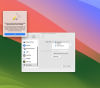
I have checked the VM configuration, but I cannot find or modify the Secure Boot setting.
Could you please assist in resolving this issue?
Thank you.
I am experiencing an issue with Parallels Desktop on my Mac.
My virtual machine running Windows 11 was working normally until yesterday. However, today it fails to start and shows the following error:
"The Secure Boot feature prevented the operating system from starting. The Secure Boot policy settings in the firmware could not authenticate the code. Check the Secure Boot policy in Setup."
I did not make any manual changes to the virtual machine configuration. The issue appeared अचानक (possibly after an update or system restart).
I have checked the VM configuration, but I cannot find or modify the Secure Boot setting.
Could you please assist in resolving this issue?
Thank you.
Attachments
MichaelB183
Bit poster
Same issue here with a MacBook Pro M5Max! Shared Connection also don't work as Bridge! Problem is on Windows and Linux VMs, not on MacOS
No problem at all with UTM on my M5 max. Wifi interface working fine with UTMI also noticed that UTM is also having the same issue so this might be a macOS issue more than a parallels issue
I have the same issue. it seems to be related to rebooting after installing a windows update 'Secure Boot Allowed Signature Database (DB) Update'. I can go back to the snapshot before that was installed and the VM reboots fine. As soon as it installs that update the VM will not boot and the error shown by BatuA appears. The instructions in the message are not helpful as there is no explicit 'Advanced' option in the Hardware section of the configuration dialog box. There are 'Advanced...' buttons on some of the options but none of them relate to secure boot.
ParallelsU1575
Bit poster
I'm running Parallels Desktop for Mac Version 1.26.2 (23919). When the Windows "Secure Boot Allowed Signature Database (DB) Update" was installed, the VM could no longer be booted. Error message, "The Secure Boot feature prevented the operating system from starting."
I'm on an Apple M1 Pro chip, with Tahoe 26.5.
I see this critical issue was reported over a month ago now. Trishna Oobeyram would be great to get an update and a fix asap. I can't use the software atm.
I'm on an Apple M1 Pro chip, with Tahoe 26.5.
I see this critical issue was reported over a month ago now. Trishna Oobeyram would be great to get an update and a fix asap. I can't use the software atm.
ParallelsU1575
Bit poster
In case this is helpful to anyone, I got some kind of resolution to this issue by:
1 Restore Windows snapshot from mid-April 2026
2 Shut down the VM
3 Remove the TPM Chip from the Parallels Windows Configuration
4 Start the VM. Shut it down again.
5 Add the TPM Chip to the Parallels Windows Configuration
6 Start the VM. Shut it down again.
7 Take a new snapshot.
8 Progressively download and install the May Windows Updates. (Taking a snapshot between each one).
Currently it says Windows is up to date. And the Secure Boot Allowed Signature Database (DB) Update did not re-surface.
1 Restore Windows snapshot from mid-April 2026
2 Shut down the VM
3 Remove the TPM Chip from the Parallels Windows Configuration
4 Start the VM. Shut it down again.
5 Add the TPM Chip to the Parallels Windows Configuration
6 Start the VM. Shut it down again.
7 Take a new snapshot.
8 Progressively download and install the May Windows Updates. (Taking a snapshot between each one).
Currently it says Windows is up to date. And the Secure Boot Allowed Signature Database (DB) Update did not re-surface.