Hello,
For the Shared networking issue with Leopard we recommend the following steps:
1. Reboot your Mac.
2. Select System Preferences from the Apple menu and click Network.
3. If the Parallels NAT port status indicator is red, uninstall Parallels in the following manner:
a. Go to Finder - Applications - Utilities - Terminal. Type and run the following commands:
• sudo rm /System/Library/Extensions/vmmain.kext
• sudo rm /System/Library/Extensions/hypervisor.kext
• sudo rm /System/Library/Extensions/helper.kext
• sudo rm /System/Library/Extensions/ConnectUSB.kext
• sudo rm /System/Library/Extensions/Pvsnet.kext
• sudo rm ~/Library/Parallels/
• sudo rm /Library/Parallels/
• sudo rm ~/Library/Preferences/com.parallels
b. Reboot your Mac and reinstall Parallels.
4. If the Parallels NAT port status indicator is green, please provide us the following so that we can diagnose the problem:
• The network adapter emulation type in Configuration of the VM
• The network connection type in Mac side (Wireless, Ethernet, Modem)
• The information from Mac’s Terminal (/Applications/Utilities/) “ifconfig†command
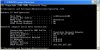
• The screenshot of Command window with “ipconfig /all†command in the Windows side (press windows(apple) key + R and type â€cmdâ€)
• The VPN client manufacturer (if you use VPN)
Please send this information to us either by attaching them to your forum post or with a Private Message. You can also send it via a support request form at
http://www.parallels.com/en/support/request/.
Best regards,
Xenos