5608 won't allow me to have an internet connection to windows

100Kate

Bit poster
Hi,

I emailed support more then a week ago, there is a page somewhere in the knowledge base, I couldn't find it. Being tired might have something to do with that. Anyways, I tried everything on that page, and it still does not work, and I told support that and they have yet to email me back.

Anyways, I have the internet fine on the Mac, as soon as I open 5608 version, I have never been able to connect to the internet through parallels to update windows or my programs there. Or use the web browser. All of this probrems started when I updated to this version, the preverious version was fine.

Any help would be greatly appreciated


K
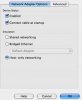
 
Open Terminal from Applications/Utilities
type in
ifconfig -a

in Windows
click Start - select Run - type cmd
in command console type
ipconfig /all
 
I will try that, in the mean time I should tell you that since this new version (5608) was installed I always get this error when shutting down windows:


Program not responding
Parallels Clipboard Synchronization

click

End Now
 
Here is the material from the MAC - I have to go now, so I'll post later with the window's data


lo0: flags=8049<UP,LOOPBACK,RUNNING,MULTICAST> mtu 16384
inet 127.0.0.1 netmask 0xff000000
inet6 ::1 prefixlen 128
inet6 fe80::1%lo0 prefixlen 64 scopeid 0x1
gif0: flags=8010<POINTOPOINT,MULTICAST> mtu 1280
stf0: flags=0<> mtu 1280
en0: flags=8863<UP,BROADCAST,SMART,RUNNING,SIMPLEX,MULTICAST> mtu 1500
ether 00:1b:63:9e:61:ee
media: autoselect status: inactive
supported media: autoselect 10baseT/UTP <half-duplex> 10baseT/UTP <full-duplex> 10baseT/UTP <full-duplex,hw-loopback> 10baseT/UTP <full-duplex,flow-control> 100baseTX <half-duplex> 100baseTX <full-duplex> 100baseTX <full-duplex,hw-loopback> 100baseTX <full-duplex,flow-control> 1000baseT <full-duplex> 1000baseT <full-duplex,hw-loopback> 1000baseT <full-duplex,flow-control> none
en1: flags=8863<UP,BROADCAST,SMART,RUNNING,SIMPLEX,MULTICAST> mtu 1500
inet6 fe80::21c:b3ff:febb:5abc%en1 prefixlen 64 scopeid 0x5
inet 192.168.1.199 netmask 0xffffff00 broadcast 192.168.1.255
ether 00:1c:b3:bb:5a:bc
media: autoselect status: active
supported media: autoselect
wlt1: flags=41<UP,RUNNING> mtu 1500
fw0: flags=8802<BROADCAST,SIMPLEX,MULTICAST> mtu 494
lladdr 00:1c:b3:ff:fe:94:31:26
media: autoselect <full-duplex> status: inactive
supported media: autoselect <full-duplex>
en2: flags=8963<UP,BROADCAST,SMART,RUNNING,PROMISC,SIMPLEX,MULTICAST> mtu 1500
inet6 fe80::21c:42ff:fe00:0%en2 prefixlen 64 scopeid 0x8
inet 10.37.129.2 netmask 0xffffff00 broadcast 10.37.129.255
ether 00:1c:42:00:00:00
media: autoselect status: active
supported media: autoselect
en3: flags=8963<UP,BROADCAST,SMART,RUNNING,PROMISC,SIMPLEX,MULTICAST> mtu 1500
inet6 fe80::21c:42ff:fe00:1%en3 prefixlen 64 scopeid 0x9
inet 10.211.55.2 netmask 0xffffff00 broadcast 10.211.55.255
ether 00:1c:42:00:00:01
media: autoselect status: active
supported media: autoselect
 
I put the ipconfig /all

where you said too.


All that happened was a dos screen flashed up, it was blank and then closed.

Yes I have an anti-virus, the same one that I had before the upgrade to 5608.

As for your last question, please look at the image attachment to this post.
 

Attachments

  • Picture 3.jpg
    Picture 3.jpg
    8.9 KB · Views: 6
Hi,


I posted above that when I do that for windows all that happened was a dos screen flashed up, it was blank and then closed. It opened and closed really fast.
 
Same problem here

I have 2 installs of Windows XP - one with IE6 and another with IE 7. My IE 7 install connects just fine. My IE 6 install does not.

Here is the Mac ifconfig output:

lo0: flags=8049<UP,LOOPBACK,RUNNING,MULTICAST> mtu 16384
inet6 fe80::1%lo0 prefixlen 64 scopeid 0x1
inet 127.0.0.1 netmask 0xff000000
inet6 ::1 prefixlen 128
gif0: flags=8010<POINTOPOINT,MULTICAST> mtu 1280
stf0: flags=0<> mtu 1280
en0: flags=8863<UP,BROADCAST,SMART,RUNNING,SIMPLEX,MULTICAST> mtu 1500
inet6 fe80::21b:63ff:fe95:d729%en0 prefixlen 64 scopeid 0x4
inet 10.0.1.197 netmask 0xffffff00 broadcast 10.0.1.255
ether 00:1b:63:95:d7:29
media: autoselect (100baseTX <full-duplex,flow-control>) status: active
supported media: autoselect 10baseT/UTP <half-duplex> 10baseT/UTP <full-duplex> 10baseT/UTP <full-duplex,hw-loopback> 10baseT/UTP <full-duplex,flow-control> 100baseTX <half-duplex> 100baseTX <full-duplex> 100baseTX <full-duplex,hw-loopback> 100baseTX <full-duplex,flow-control> 1000baseT <full-duplex> 1000baseT <full-duplex,hw-loopback> 1000baseT <full-duplex,flow-control> none
fw0: flags=8802<BROADCAST,SIMPLEX,MULTICAST> mtu 4078
lladdr 00:1b:63:ff:fe:8b:bb:4c
media: autoselect <full-duplex> status: inactive
supported media: autoselect <full-duplex>
en1: flags=8863<UP,BROADCAST,SMART,RUNNING,SIMPLEX,MULTICAST> mtu 1500
inet6 fe80::21b:63ff:fecd:22b%en1 prefixlen 64 scopeid 0x6
inet 10.0.1.195 netmask 0xffffff00 broadcast 10.0.1.255
ether 00:1b:63:cd:02:2b
media: autoselect status: active
supported media: autoselect
en3: flags=8963<UP,BROADCAST,SMART,RUNNING,PROMISC,SIMPLEX,MULTICAST> mtu 1500
inet6 fe80::21c:42ff:fe00:1%en3 prefixlen 64 scopeid 0x7
inet 10.211.55.2 netmask 0xffffff00 broadcast 10.211.55.255
ether 00:1c:42:00:00:01
media: autoselect status: active
supported media: autoselect
en2: flags=8963<UP,BROADCAST,SMART,RUNNING,PROMISC,SIMPLEX,MULTICAST> mtu 1500
inet6 fe80::21c:42ff:fe00:0%en2 prefixlen 64 scopeid 0x8
inet 10.37.129.2 netmask 0xffffff00 broadcast 10.37.129.255
ether 00:1c:42:00:00:00
media: autoselect status: active
supported media: autoselect


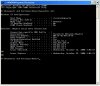
Windows output screen shot attached.

Please advise...
 

Attachments

  • Picture3.jpg
    Picture3.jpg
    107.2 KB · Views: 4
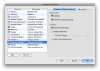
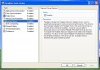
I don't see the preference you are referring to. Here is a screen shot of my Parallels preferences and another of the preferences inside windows.
 

Attachments

  • Picture 4.jpg
    Picture 4.jpg
    118.3 KB · Views: 4
  • Picture 5.jpg
    Picture 5.jpg
    106 KB · Views: 4
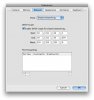
Here you go. Please keep in mind that I have 2 virtual machines installed. One of them connects to the net just fine and the other does not. Both are Win XP, but one uses IE6 and the other uses IE7.
 

Attachments

  • Picture 7.jpg
    Picture 7.jpg
    69 KB · Views: 5
Back
Top