A Parallels tools problem after updating kali of 2018.2

liu396155102

Bit poster
After updating kali of 2018.2,i installed paralles tools on it successfully.But when i rebbooted it, i can't get in desktop.It stoped at the screen of "Started update UTMP about system Runlevel". i have tried on 43365 version and the latest version,the problem still appear.How to solve it?Who can help me ?
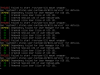
 
Error in systemd boot loop:
Code:
[OK] Created slice of User slice of UID 135.   //(UID can be different)
[OK] Started Session c92  of user Debian-gdm. // cXX is Counting
[OK] Removed slice User Slice of UID 135.
[FAILED] Failed to start /run/user/135 mount wrapper.
[DEPEND] Dependency failed for User Manager for UID 135.

Pls. fix this.
 
systemd strikes again! pfft. If you un-install Parallel tools from kali by running the same installer you can get back to working order but without the VM extensions. Not a fix but at least you can get back in to get scripts etc..
 
Hi everyone, I have the same issue and also a question: How do you remove the Paralleles Tools when you cannot boot on your Kali system ?

Thanks for your help

[edit] I did it by booting in recovery mode, sorry for the question.

@Parallel guys: any idea when this is going to be fixed ?
Thanks
 
Last edited:
Found a solution without long headache:
From: https://forum.parallels.com/threads...3-3-1-43365-fixes-nothing.344639/#post-842979
use the following bash commands:
Code:
mkidr /tmp
cd /tmp
wget http://ftp.debian.org/debian/pool/main/x/xorg-server/xserver-common_1.19.2-1+deb9u2_all.deb
wget http://ftp.debian.org/debian/pool/main/x/xorg-server/xserver-xorg-core_1.19.2-1+deb9u2_amd64.deb
wget http://ftp.debian.org/debian/pool/main/x/xorg-server/xwayland_1.19.2-1+deb9u2_amd64.deb
wget http://ftp.debian.org/debian/pool/main/x/xserver-xorg-video-vesa/xserver-xorg-video-vesa_2.3.4-1+b2_amd64.deb
dpkg --force-all -i *.deb
apt-mark hold xserver-common xserver-xorg-core xwayland xserver-xorg-video-vesa
apt-get --fix-broken install

But also a note for the Parallels Team, please fix your x-org problems. Thank You.
 
Found a solution without long headache:
From: https://forum.parallels.com/threads...3-3-1-43365-fixes-nothing.344639/#post-842979
use the following bash commands:
Code:
mkidr /tmp
cd /tmp
wget http://ftp.debian.org/debian/pool/main/x/xorg-server/xserver-common_1.19.2-1+deb9u2_all.deb
wget http://ftp.debian.org/debian/pool/main/x/xorg-server/xserver-xorg-core_1.19.2-1+deb9u2_amd64.deb
wget http://ftp.debian.org/debian/pool/main/x/xorg-server/xwayland_1.19.2-1+deb9u2_amd64.deb
wget http://ftp.debian.org/debian/pool/main/x/xserver-xorg-video-vesa/xserver-xorg-video-vesa_2.3.4-1+b2_amd64.deb
dpkg --force-all -i *.deb
apt-mark hold xserver-common xserver-xorg-core xwayland xserver-xorg-video-vesa
apt-get --fix-broken install

But also a note for the Parallels Team, please fix your x-org problems. Thank You.
Great. Did the fix for me as well. Thank you for sharing and please ParallelsTeam fix this.
 
Back
Top