
Install the app
How to install the app on iOS
Follow along with the video below to see how to install our site as a web app on your home screen.
Note: This feature may not be available in some browsers.
You are using an out of date browser. It may not display this or other websites correctly.
You should upgrade or use an alternative browser.
You should upgrade or use an alternative browser.


Dmitry Geynisman
Parallels Team
Hi @DavidA49, would you please update to the latest Parallels Desktop version (17.0.0, or 1.7.0 for App Store) and check this aspect one more time? Please note that you need to update Parallels Tools in Windows. We have reworked our display driver that no provides better synchronization with the Mac display and not limited to 60Hz anymore.On Windows HDR support is not supported with parallels vu
even with 17.0.1 hdr does not work on windows 11Hi @DavidA49, would you please update to the latest Parallels Desktop version (17.0.0, or 1.7.0 for App Store) and check this aspect one more time? Please note that you need to update Parallels Tools in Windows. We have reworked our display driver that no provides better synchronization with the Mac display, not limited to 60Hz and should enable HDR support.
cant say about 10 since everyone has been forced to upgrade to 11
it happens with windows 10 too, HDR just does not work now.
I however can't say anything about 120FPS support as my screen is 60FPS, but I can confirm that settings says no HDR, and my HDR retraced unity app does not look the same without it
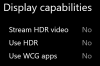
no proof on my non-unity games, thats why I use a VM in the first place.
here's the full version of the image in case it becomes vintage or you need true proof:
I however can't say anything about 120FPS support as my screen is 60FPS, but I can confirm that settings says no HDR, and my HDR retraced unity app does not look the same without it
no proof on my non-unity games, thats why I use a VM in the first place.
here's the full version of the image in case it becomes vintage or you need true proof:
Dmitry Geynisman
Parallels Team
Hi @MatthewT9, do I understand correctly that you want to play some Unity-based Windows games that have HDR support? Currently, HDR is not supported in Parallels Desktop.it happens with windows 10 too, HDR just does not work now.
I however can't say anything about 120FPS support as my screen is 60FPS, but I can confirm that settings says no HDR, and my HDR retraced unity app does not look the same without it
View attachment 18638
no proof on my non-unity games, thats why I use a VM in the first place.
here's the full version of the image in case it becomes vintage or you need true proof:
View attachment 18638
As for the display refresh rate, starting Parallels Desktop 17, the refresh rate is not limited to 60Hz anymore, Windows will sync with the real display refresh rate, be it 75, 120, 144Hz.
your previous statement in this thread says that the new version should have HDRHi @MatthewT9, do I understand correctly that you want to play some Unity-based Windows games that have HDR support? Currently, HDR is not supported in Parallels Desktop.
As for the display refresh rate, starting Parallels Desktop 17, the refresh rate is not limited to 60Hz anymore, Windows will sync with the real display refresh rate, be it 75, 120, 144Hz.
so does it support it or not ?
Dmitry Geynisman
Parallels Team
No support for HDR, please accept my apologies for the disinformation.your previous statement in this thread says that the new version should have HDR
so does it support it or not ?
Any ETA for the HDR support?No support for HDR, please accept my apologies for the disinformation.

Mikhail Ushakov
Problem solver
hi @OgulcanB ,For built-in and external displays HDR support
thanks for posting this! would you provide more details about this, please? what monitor are you using? Do you get any issues when running Parallels Desktop on such an external display?
blackxfiied
Bit poster
Hello, this is just a follow-up from two years later on an ETA for HDR support
I'm currently on Parallels Desktop 19.3.0 (54924)
with still no HDR support on my MacBook Pro (14", 2021). This would be an amazing feature for Parallels Desktop 20, or even a later version of parallels desktop 19.
I'm currently on Parallels Desktop 19.3.0 (54924)
with still no HDR support on my MacBook Pro (14", 2021). This would be an amazing feature for Parallels Desktop 20, or even a later version of parallels desktop 19.
Dmitry Geynisman
Parallels Team
Hey @blackxfiied, thanks a lot for your feedback. May I wonder how you would use HDR support in Windows VM? This will help us better understand the use case and potentially prioritize the development.Hello, this is just a follow-up from two years later on an ETA for HDR support
I'm currently on Parallels Desktop 19.3.0 (54924)
with still no HDR support on my MacBook Pro (14", 2021). This would be an amazing feature for Parallels Desktop 20, or even a later version of parallels desktop 19.
Hey @blackxfiied, thanks a lot for your feedback. May I wonder how you would use HDR support in Windows VM? This will help us better understand the use case and potentially prioritize the development.
Here's one: since you can't share internet in reverse (if the VM has internet and the Mac doesn't) you can't currently watch HDR content.
Dmitry Geynisman
Parallels Team
Thanks, @BallO. Would you please elaborate on the situation of "the VM has internet and the Mac doesn't"? Why is that happening?Here's one: since you can't share internet in reverse (if the VM has internet and the Mac doesn't) you can't currently watch HDR content.
I am a paid Parallels user on a MacBook M1, who needs access to HDR.Hey @blackxfiied, thanks a lot for your feedback. May I wonder how you would use HDR support in Windows VM? This will help us better understand the use case and potentially prioritize the development.
1. I am the creator of Blur Busters / TestUFO which is getting a HDR version of website shortly, which works on Chrome for Windows 10/11 and Chrome for Mac, with a special flag.
2. I am helping the author of PAINTnet graphics editor test HDR and WCG improvements.
3. I help co-author research papers in temporal motion quality, but many of my parties are prodding me to become a "reluctant-turned-eager" HDR/WCG expert...
Windows HDR is usually very crappy, but the MacBook XDR displays are among the best HDR displays for their prices, and I would absolutely LOVE to run Windows on Apple M1 XDR laptops due to their HDR looking 10x better than the ugly HDR on normal Windows.
Good testing website for HDR (use Google Chrome on Mac): https://gregbenzphotography.com/hdr/
View this on any new MacBook XDR display, HDR becomes shockingly amazing.
It works fine in Mac Safari/Chrome, Windows x86 and ARM (connected to HDR display), but doesn't work in Windows 11 Parallels.
Amazing HDR will come to Windows within 2-3 years, with the upcoming boom of high-refresh-rate OLED office monitors, but please help me trailblaze.
I am also Rejhon Technologies Inc. and I am willing to pay Parallels a bounty reward for the addition of HDR support to Parallels. Please contact me at www[dot]rejtech[dot]com if Parallels requires "incentivization" to add HDR to Parallels
I am a paid Parallels user on a MacBook M1, who needs access to HDR.Hey @blackxfiied, thanks a lot for your feedback. May I wonder how you would use HDR support in Windows VM? This will help us better understand the use case and potentially prioritize the development.
1. I am the creator of Blur Busters / TestUFO which is getting a HDR version of website shortly, which works on Chrome for Windows 10/11 and Chrome for Mac, with a special flag.
2. I am helping the author of PAINTnet graphics editor test HDR and WCG improvements.
3. I help co-author research papers in temporal motion quality, but many of my parties are prodding me to become a "reluctant-turned-eager" HDR/WCG expert...
Windows HDR is usually very crappy, but the MacBook XDR displays are among the best HDR displays for their prices, and I would absolutely LOVE to run Windows on Apple M1 XDR laptops due to their HDR looking 10x better than the ugly HDR on normal Windows.
Good testing website for HDR inside a web browser (use Google Chrome on Mac) is "Greg Benz Photography HDR" website
View this on any new MacBook XDR display, HDR becomes shockingly amazing.
It works fine in Mac Safari/Chrome, Windows x86 and ARM (connected to HDR display), but doesn't work in Windows 11 Parallels.
Amazing HDR will come to Windows within 2-3 years, with the upcoming boom of high-refresh-rate OLED office monitors, but please help me trailblaze.
I am also Rejhon Technologies Inc. and I am willing to pay Parallels a bounty reward for the addition of HDR support to Parallels. Please contact me privately if Parallels requires "incentivization" to add HDR to Parallels
Thanks, @BallO. Would you please elaborate on the situation of "the VM has internet and the Mac doesn't"? Why is that happening?
The VM has internet via a USB connected device. The Mac has no internet because virtual routing doesn't work for reasons unknown.
We need HDR support. It's almost 2025.