
Install the app
How to install the app on iOS
Follow along with the video below to see how to install our site as a web app on your home screen.
Note: This feature may not be available in some browsers.
You are using an out of date browser. It may not display this or other websites correctly.
You should upgrade or use an alternative browser.
You should upgrade or use an alternative browser.
Add MD5 quick check
- Thread starter Harvey1
- Start date
-
- Tags
- checksum checker
Hello,
It would nice to have a simple checksum file checker.
You drop the file, and the checksum.
This is how I do this today.
open Terminal by searching for it in Spotlight or Launchpad, or open it directly in Applications > Utilities.
Once open, type in "shasum -a " followed by either 1 or 256, depending on whether you want to verify the downloaded file against a SHA-1 or SHA-256 checksum provided by its developer.
Next, add a space, followed by the full path to the file. (Seen above.)
For instance, we're going to check the "HandBrake-1.0.7.dmg" file, which is located in the Downloads folder, hence the path will look like this: "/Users/future/Downloads/HandBrake-1.0.7.dmg".
Alternatively (and much more easily), you can simply drag and drop the file onto Terminal's window to automatically paste the full path to it.
It would nice to have a simple checksum file checker.
You drop the file, and the checksum.
This is how I do this today.
open Terminal by searching for it in Spotlight or Launchpad, or open it directly in Applications > Utilities.
Once open, type in "shasum -a " followed by either 1 or 256, depending on whether you want to verify the downloaded file against a SHA-1 or SHA-256 checksum provided by its developer.
Next, add a space, followed by the full path to the file. (Seen above.)
For instance, we're going to check the "HandBrake-1.0.7.dmg" file, which is located in the Downloads folder, hence the path will look like this: "/Users/future/Downloads/HandBrake-1.0.7.dmg".
Alternatively (and much more easily), you can simply drag and drop the file onto Terminal's window to automatically paste the full path to it.

Liubov Kulakova
Parallels Team
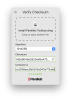
Check out our new tool in Parallels Toolbox 5.5 - Verify Checksum.
You can choose between MD5, CRC32, SHA1/256/512 to generate and compare checksum.
You can choose between MD5, CRC32, SHA1/256/512 to generate and compare checksum.