
Hello, i'm running Parallels Desktop 17.1.1 on a Mac Mini M1 and i installed a Windows 11 Virtual Machine. I'm using the trial version in order to test.
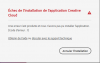
I have a Windows licence of Adobe Photoshop Elements 2021 on windows and would like to use on the Parallels. Unfortunately, i'm not able to install Adobe Creative Cloud neither Elements 2021 having the following error (code error : 1) and seems there is some problem to connect to Adobe servers while there is no connection problem anyway.
I moved the installation package of Adobe Creative to the local drive and run from it but same problem. It seems a partial installation has been done on Windows 11 but not able to remove or clean Adobe Creative Cloud from Windows 11 fully.
Any idea how to run this adobe stuff on Parallels Desktop 17 or at least how i could reinstall fully a windows 11 to restart from scratch ?
Thanks a lot for your support.
I have a Windows licence of Adobe Photoshop Elements 2021 on windows and would like to use on the Parallels. Unfortunately, i'm not able to install Adobe Creative Cloud neither Elements 2021 having the following error (code error : 1) and seems there is some problem to connect to Adobe servers while there is no connection problem anyway.
I moved the installation package of Adobe Creative to the local drive and run from it but same problem. It seems a partial installation has been done on Windows 11 but not able to remove or clean Adobe Creative Cloud from Windows 11 fully.
Any idea how to run this adobe stuff on Parallels Desktop 17 or at least how i could reinstall fully a windows 11 to restart from scratch ?
Thanks a lot for your support.