
Install the app
How to install the app on iOS
Follow along with the video below to see how to install our site as a web app on your home screen.
Note: This feature may not be available in some browsers.
You are using an out of date browser. It may not display this or other websites correctly.
You should upgrade or use an alternative browser.
You should upgrade or use an alternative browser.
After update of Parallels, I cannot create new VMs
- Thread starter ArnoW1
- Start date
Hello ArnoW1, This issue is under investigation by Parallels Development team. meanwhile kindly try this steps.Hi,
Since the last update of my parallels installation 14.1.2 (45479) I cannot create new VMs.
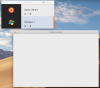
After clicking the + in the control center, I only get a blank window.
See attached screenshot.
Please help!
Arno
1) Open Terminal (Spotlight Search > Terminal) and make certain the Parallels Desktop app is closed (Parallels Desktop logo in Mac menu bar > Quit Parallels Desktop) 2) Run the next command, which would allow to run Parallels Desktop application to get an opportunity create a new virtual machine:
QT_QUICK_BACKEND=software open /Applications/Parallels\ Desktop.app
3) This action is required to run just one time, Once Parallels Desktop is launched please attempt to create a virtual machine.
Thank you, this helps. Turning on the Qt software renderer has a big performance impact, but after creating the VM the normal start works.QT_QUICK_BACKEND=software open /Applications/Parallels\ Desktop.app
Jean-MarcP1
Bit poster
Hi,
I am trying to create a new vm under parallels and do not see the option. Every time I start parallel it always brings up my boot camp vm only. How do I create a new windows vm to run from mac. Thanks.
I am trying to create a new vm under parallels and do not see the option. Every time I start parallel it always brings up my boot camp vm only. How do I create a new windows vm to run from mac. Thanks.

Maria@Parallels
Problem solver
Hi, could you share the screenshot of window which you got when start Parallels Desktop please?Hi,
I am trying to create a new vm under parallels and do not see the option. Every time I start parallel it always brings up my boot camp vm only. How do I create a new windows vm to run from mac. Thanks.